Free Shipping on Domestic Orders $75+

Nikon Coolpix L27 Screen Replacement

What you need

    1. Nikon Coolpix L27 Screen Replacement, Screen: step 1, image 1 of 3 Nikon Coolpix L27 Screen Replacement, Screen: step 1, image 2 of 3 Nikon Coolpix L27 Screen Replacement, Screen: step 1, image 3 of 3
      • Undo the latch at the bottom of the camera by pushing it to the side

      • Remove the batteries (and memory card if applicable)

      Ask FixBot

      Add Comment

    2. Nikon Coolpix L27 Screen Replacement: step 2, image 1 of 2 Nikon Coolpix L27 Screen Replacement: step 2, image 2 of 2
      • Remove the two 5 mm Phillips #000 screws from the left side.

      Ask FixBot

      Add Comment

    3. Nikon Coolpix L27 Screen Replacement: step 3, image 1 of 3 Nikon Coolpix L27 Screen Replacement: step 3, image 2 of 3 Nikon Coolpix L27 Screen Replacement: step 3, image 3 of 3
      • Lift the cover labeled "A/V OUT" to expose a hidden screw.

      • Remove two 5 mm Phillips #000 screws from the bottom of the camera.

      Ask FixBot

      Add Comment

    4. Nikon Coolpix L27 Screen Replacement: step 4, image 1 of 2 Nikon Coolpix L27 Screen Replacement: step 4, image 2 of 2
      • Remove the two 5 mm Phillips #000 screws from the right side of the camera.

      Ask FixBot

      Add Comment

    5. Nikon Coolpix L27 Screen Replacement: step 5, image 1 of 3 Nikon Coolpix L27 Screen Replacement: step 5, image 2 of 3 Nikon Coolpix L27 Screen Replacement: step 5, image 3 of 3
      • Carefully pry the back cover starting from the battery latch.

      • Once all sides are loose, lift the back cover up and off.

      Ask FixBot

      Add Comment

    6. Nikon Coolpix L27 Screen Replacement: step 6, image 1 of 1
      • Carefully lift the LCD screen up towards the bottom of the camera.

      • The LCD is connected to a cable so don't pull it out yet.

      Ask FixBot

      Add Comment

    7. Nikon Coolpix L27 Screen Replacement: step 7, image 1 of 1
      • Lightly push back the white switch holding in the screen cable

      Ask FixBot

      Add Comment

    8. Nikon Coolpix L27 Screen Replacement: step 8, image 1 of 2 Nikon Coolpix L27 Screen Replacement: step 8, image 2 of 2
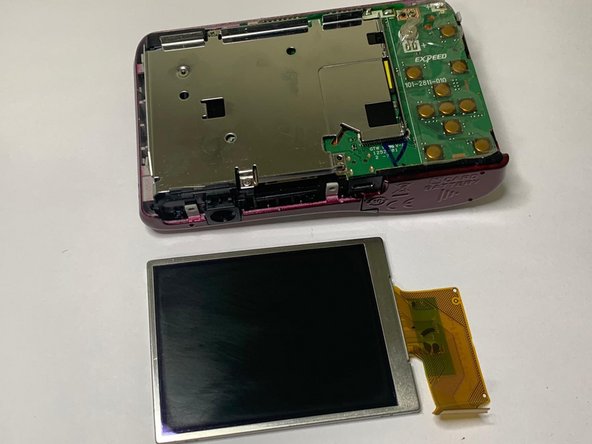
      • Remove the cable from the camera.

      • Lift the screen out.

      Ask FixBot

      Add Comment

Conclusion

To reassemble your device, follow these instructions in reverse order.

Cancel: I did not complete this guide.

One other person completed this guide.

Vishalpreet Sandhu

Member since: 01/18/22

184 Reputation

1 Guide authored

2 Guide Comments

would you know how to replace the little button battery just next to the screen, because the Lense is not retracting anymore?

Walter D. - Reply Share

where can i buy a screen replacement please

mo0nflwr - Reply Share

Add Comment

View Statistics:

Past 24 Hours: 3

Past 7 Days: 9

Past 30 Days: 75

All Time: 1,953