Free Shipping on Domestic Orders $75+

Nikon Coolpix B700 Back Frame Assembly Replacement

What you need

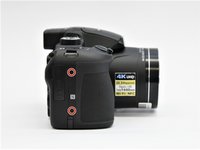
    1. Nikon Coolpix B700 Back Frame Assembly Replacement, Back Frame Assembly: step 1, image 1 of 1
      • Use the Phillips screwdriver to remove the two 5.5 mm screws on the left side of the camera.

      Ask FixBot

      Add Comment

    2. Nikon Coolpix B700 Back Frame Assembly Replacement: step 2, image 1 of 1
      • Use the Phillips screwdriver to remove seven 5.5 mm screws from the bottom of the camera.

      Ask FixBot

      Add Comment

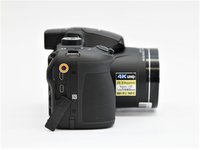
    3. Nikon Coolpix B700 Back Frame Assembly Replacement: step 3, image 1 of 2 Nikon Coolpix B700 Back Frame Assembly Replacement: step 3, image 2 of 2
      • Use the Phillips screwdriver to remove the two 5.5mm screws on the right side of the camera.

      • Open the HDMI flap to remove a 5.5mm screw.

      • Don't forget to replace the hidden screw under the HDMI flap during reassembly.

      Ask FixBot

      Add Comment

    4. Nikon Coolpix B700 Back Frame Assembly Replacement: step 4, image 1 of 1
      • Use the Phillips screwdriver to remove the two 5.5mm screws under the LCD panel.

      Ask FixBot

      Add Comment

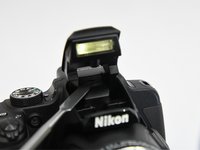
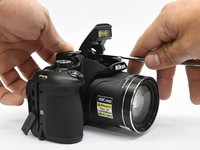
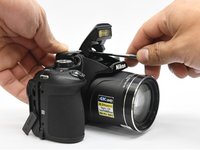
    5. Nikon Coolpix B700 Back Frame Assembly Replacement: step 5, image 1 of 3 Nikon Coolpix B700 Back Frame Assembly Replacement: step 5, image 2 of 3 Nikon Coolpix B700 Back Frame Assembly Replacement: step 5, image 3 of 3
      • Open the flash assembly and insert the spudger into the slot under the flash unit and twist.

      • While twisting, pry apart the shell to split the camera in half.

      Ask FixBot

      Add Comment

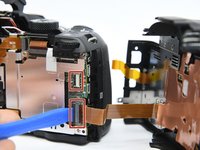
    6. Nikon Coolpix B700 Back Frame Assembly Replacement: step 6, image 1 of 1
      • Be careful not to damage the ribbons that connect the halves together.

      Ask FixBot

      Add Comment

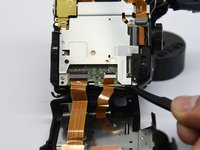
    7. Nikon Coolpix B700 Back Frame Assembly Replacement: step 7, image 1 of 2 Nikon Coolpix B700 Back Frame Assembly Replacement: step 7, image 2 of 2
      • Place the pry tool under the black latch. Lift gently until the latch flips up.

      • Gently pull the ribbon away from the latch.

      • Be gentle when taking ribbons out and apart because they are fragile.

      Ask FixBot

      Add Comment

Finish Line

Cancel: I did not complete this guide.

2 other people completed this guide.

0 Guide Comments

Add Comment

View Statistics:

Past 24 Hours: 1

Past 7 Days: 5

Past 30 Days: 27

All Time: 1,209