Free Shipping on Domestic Orders $75+

Nikon Coolpix 995 LCD Replacement

What you need

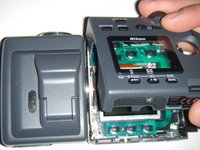
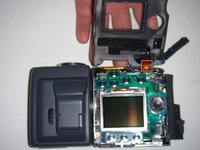
  1. Nikon Coolpix 995 LCD Replacement, LCD: step 1, image 1 of 2 Nikon Coolpix 995 LCD Replacement, LCD: step 1, image 2 of 2
    • Turn the lens/flash assembly 90 degrees, until you see the two Phillips #00 screws,

    • Remove the two screws with a Phillips #00 screwdriver.

    • Flip the flash so that you can access the remaining two screws. Remove these screws following the same method as before.

    • Refer to the second image to locate the second set of screws. The relevant screws are highlighted in red.

    Ask FixBot

    Add Comment

  2. Nikon Coolpix 995 LCD Replacement: step 2, image 1 of 1
    • Flip the camera up-side down.

    • Remove the two Phillips #00 screws located near the battery compartment.

    Ask FixBot

    Add Comment

  3. Nikon Coolpix 995 LCD Replacement: step 3, image 1 of 1
    • Open the memory card compartment cover.

    • You can now see four screws under the cover. Remove all four screws.

    • Refer to the image to locate the four screws. Make sure that you remove only the four screws identified in the image.

    Ask FixBot

    Add Comment

  4. Nikon Coolpix 995 LCD Replacement: step 4, image 1 of 2 Nikon Coolpix 995 LCD Replacement: step 4, image 2 of 2
    • Use your thumb to carefully lift the bottom side of the casing near the battery.

    • Pay attention to a cable located at the top of the assembly, as it is prone to breakage. Refer to the second image to locate the cable.

    Ask FixBot

    Add Comment

  5. Nikon Coolpix 995 LCD Replacement: step 5, image 1 of 1
    • Use a spudger to flip the tabs that hold the screen.

    • Refer to the image for more details. The tabs are circled in red.

    Ask FixBot

    Add Comment

  6. Nikon Coolpix 995 LCD Replacement: step 6, image 1 of 1
    • Carefully lift the LCD from the bottom. It should come out fairly easily.

    Ask FixBot

    Add Comment

Conclusion

To reassemble your device, follow these instructions in reverse order.

Cancel: I did not complete this guide.

Cory Layman

Member since: 10/04/11

93 Reputation

3 Guides authored

Team

UW Stout, Team 1-5, Zhou Fall 2011 Member of UW Stout, Team 1-5, Zhou Fall 2011

UWSTOUT-ZHOU-F11S1G5

5 Members

7 Guides authored

0 Guide Comments

Add Comment

View Statistics:

Past 24 Hours: 1

Past 7 Days: 10

Past 30 Days: 49

All Time: 3,104