Free Shipping on Domestic Orders $75+

Nikon CoolPix S600 LCD Replacement

Views: 2K

View statistics:

Past 24 Hours:
2
Past 7 Days:
22
Past 30 Days:
107
All Time:
1,990
Comments: 0

No one has left comments on this guide. Will you be first?

Go to guide comments
Completed: 0

No one has marked this guide "completed." Will you be the first?

Favorites: 2

2 people have favorited (and subscribed to) this guide. Will you be next?

Time Required: 30 minutes
Difficulty: Difficult
Needs Better Images

Better photos will improve this guide. Help out by taking, editing, or uploading new ones!

Nikon CoolPix S600 LCD Replacement

What you need

Tools

    1. Nikon CoolPix S600 LCD Replacement, Front and Rear Casing: step 1, image 1 of 1
      • With the lens facing forward, remove the one 4.2 mm screw on the bottom right hand corner of the camera.

      Ask FixBot

      Add Comment

    2. Nikon CoolPix S600 LCD Replacement: step 2, image 1 of 1
      • Remove the chrome side cover from the body of the camera.

      Ask FixBot

      Add Comment

    3. Nikon CoolPix S600 LCD Replacement: step 3, image 1 of 1
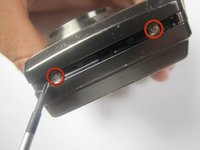
      • Remove the four 3.2 mm screws on the bottom of the camera.

      Ask FixBot

      Add Comment

    4. Nikon CoolPix S600 LCD Replacement: step 4, image 1 of 2 Nikon CoolPix S600 LCD Replacement: step 4, image 2 of 2
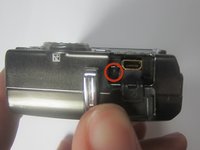
      • Remove the two 3.2 mm screws from the right side of the camera (with lens is facing forward)

      • Remove the one 3.2 mm screw from the left side of the camera (with lens facing foward)

      Ask FixBot

      Add Comment

    5. Nikon CoolPix S600 LCD Replacement: step 5, image 1 of 2 Nikon CoolPix S600 LCD Replacement: step 5, image 2 of 2
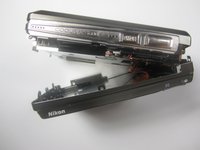
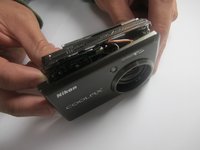
      • Gently separate the back cover from the body of the camera.

      • The back casing will still be connected to the circuit board by a ribbon

      Ask FixBot

      Add Comment

    6. Nikon CoolPix S600 LCD Replacement: step 6, image 1 of 1
      Tool used on this step:
      Tweezers
      $4.99
      Buy
      • Use the tweezers to disconnect the ribbon from the circuit board.

      Ask FixBot

      Add Comment

    7. Nikon CoolPix S600 LCD Replacement: step 7, image 1 of 1
      • Remove the one 2.6 mm screw from the left side of the camera (with the lens facing forward)

      Ask FixBot

      Add Comment

    8. Nikon CoolPix S600 LCD Replacement: step 8, image 1 of 2 Nikon CoolPix S600 LCD Replacement: step 8, image 2 of 2
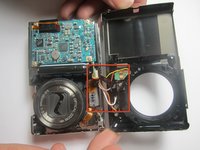
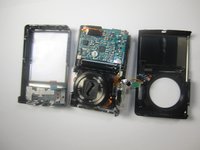
      • Gently separate the front cover from the body of the camera.

      • The front casing will still be connected to the circuit board by a few wires

      Ask FixBot

      Add Comment

    9. Nikon CoolPix S600 LCD Replacement: step 9, image 1 of 1
      • Remove the two 3.2 mm screws that hold the flash to the front cover.

      Ask FixBot

      Add Comment

    10. Nikon CoolPix S600 LCD Replacement: step 10, image 1 of 3 Nikon CoolPix S600 LCD Replacement: step 10, image 2 of 3 Nikon CoolPix S600 LCD Replacement: step 10, image 3 of 3
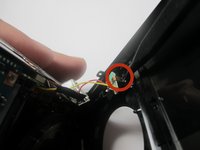
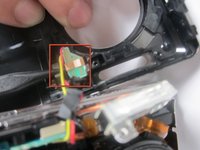
      • Use the Spudger to remove the copper colored light bulb clip.

      • Remove the front cover entierly from the camera body.

      Ask FixBot

      Add Comment

    1. Nikon CoolPix S600 LCD Replacement, LCD: step 11, image 1 of 1
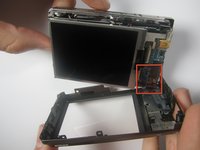
      • Gently remove LCD ribbon from the mother board

      • The screen will still be connected to the mother board by two very small wires (black & red)

      Ask FixBot

      Add Comment

    2. Nikon CoolPix S600 LCD Replacement: step 12, image 1 of 1
      • Desolder both wires from the mother board.

      • Refer to iFixit's solder/desoldering guide for the correct procedure to desolder the connection.

      Ask FixBot

      Add Comment

    3. Nikon CoolPix S600 LCD Replacement: step 13, image 1 of 1
      • Separate the LCD screen from the rest of the mother board

      Ask FixBot

      Add Comment

Conclusion

To reassemble your device, follow these instructions in reverse order.

Cancel: I did not complete this guide.

andreas anggasastra

Member since: 09/14/11

116 Reputation

5 Guides authored

Team

Cuesta, Team 1-6, Zipperian Fall 2011 Member of Cuesta, Team 1-6, Zipperian Fall 2011

CUESTA-ZIPPERIAN-F11S1G6

2 Members

60 Guides authored

0 Guide Comments

Add Comment

View Statistics:

Past 24 Hours: 2

Past 7 Days: 22

Past 30 Days: 107

All Time: 1,990