Free Shipping on Domestic Orders $75+

Nikon COOLPIX P2 WiFi Card Replacement

What you need

  1. Nikon COOLPIX P2 WiFi Card Replacement, Case: step 1, image 1 of 1
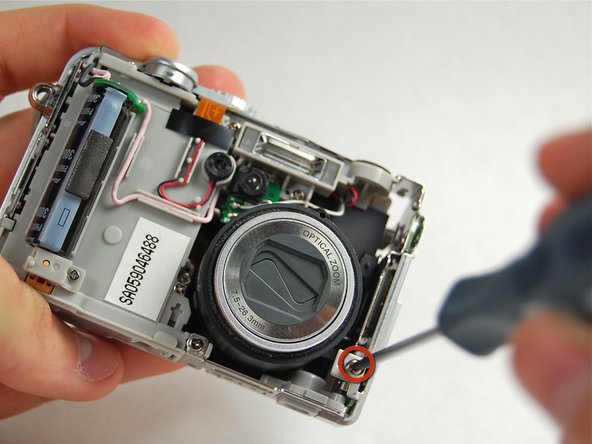
    • Remove the screw located near the speaker port using a Phillips 00 screwdriver.

    Ask FixBot

    Add Comment

  2. Nikon COOLPIX P2 WiFi Card Replacement: step 2, image 1 of 1
    • Turn camera upside down so that the battery compartment is facing you.

    • Remove all four screws from the bottom of the camera with a Phillips 00 screwdriver.

    Ask FixBot

    Add Comment

  3. Nikon COOLPIX P2 WiFi Card Replacement: step 3, image 1 of 1
    • Rotate the camera to the opposite side where the A/V outlet is located.

    • Unscrew and remove all four screws with a Phillips 00 screwdriver.

    Ask FixBot

    Add Comment

  4. Nikon COOLPIX P2 WiFi Card Replacement: step 4, image 1 of 1
    • Turn the camera so that the Wi-Fi adapter is facing you.

    • Unscrew and remove all four screws with a Phillips 00 screwdriver.

    Ask FixBot

    Add Comment

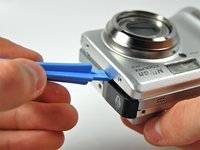
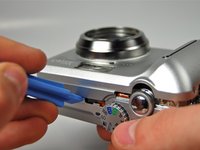
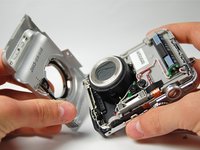
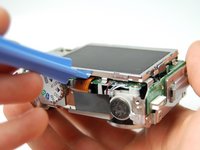
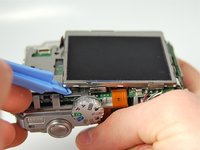
  5. Nikon COOLPIX P2 WiFi Card Replacement: step 5, image 1 of 3 Nikon COOLPIX P2 WiFi Card Replacement: step 5, image 2 of 3 Nikon COOLPIX P2 WiFi Card Replacement: step 5, image 3 of 3
    • Using a plastic opening tool, pry the front casing of the camera.

    • Continue this motion all around the front casing of the camera.

    • Gently pull apart the front casing from the rest of the camera.

    Ask FixBot

    Add Comment

  6. Nikon COOLPIX P2 WiFi Card Replacement: step 6, image 1 of 1
    • Using the plastic opening tool pry the back casing of the camera.

    Ask FixBot

    Add Comment

  7. Nikon COOLPIX P2 WiFi Card Replacement: step 7, image 1 of 1
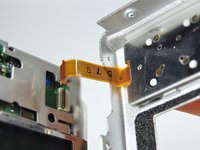
    • Orange ribbon is fragile

    • Carefully pull apart the back casing of the camera from the front of the camera without tearing the orange ribbon.

    Ask FixBot

    Add Comment

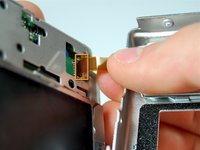
  8. Nikon COOLPIX P2 WiFi Card Replacement: step 8, image 1 of 2 Nikon COOLPIX P2 WiFi Card Replacement: step 8, image 2 of 2
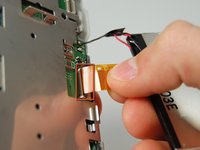
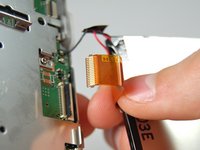
    • Pull down the on the black latch to carefully separate the orange ribbon from the motherboard.

    • Pull apart the orange ribbon and front casing from the rest of the camera.

    Ask FixBot

    Add Comment

  9. Nikon COOLPIX P2 WiFi Card Replacement, LCD Screen: step 9, image 1 of 2 Nikon COOLPIX P2 WiFi Card Replacement, LCD Screen: step 9, image 2 of 2
    • Use plastic opening tool to carefully pry the LCD Screen from the camera.

    Ask FixBot

    Add Comment

  10. Nikon COOLPIX P2 WiFi Card Replacement: step 10, image 1 of 2 Nikon COOLPIX P2 WiFi Card Replacement: step 10, image 2 of 2
    • Gently pull the ribbon cable down to release the latch, then pull up to remove it from the motherboard.

    Ask FixBot

    Add Comment

  11. Nikon COOLPIX P2 WiFi Card Replacement: step 11, image 1 of 1
    Ask FixBot

    Add Comment

  12. Nikon COOLPIX P2 WiFi Card Replacement, WiFi Card: step 12, image 1 of 1
    • Continue by removing two screws from the back of the camera body.

    Ask FixBot

    Add Comment

  13. Nikon COOLPIX P2 WiFi Card Replacement: step 13, image 1 of 1
    • Remove the screw connecting the wifi card cover to the front of the camera.

    Ask FixBot

    Add Comment

  14. Nikon COOLPIX P2 WiFi Card Replacement: step 14, image 1 of 1
    • Remove the final screw connecting the Wifi card cover to the case.

    Ask FixBot

    Add Comment

  15. Nikon COOLPIX P2 WiFi Card Replacement: step 15, image 1 of 1
    • Gently pull the Wifi card cover off of the camera body.

    Ask FixBot

    Add Comment

  16. Nikon COOLPIX P2 WiFi Card Replacement: step 16, image 1 of 1
    • Remove the screw holding the Wifi Card to the camera body.

    Ask FixBot

    Add Comment

  17. Nikon COOLPIX P2 WiFi Card Replacement: step 17, image 1 of 1
    • Gently pull the WiFi card out of the camera.

    Ask FixBot

    Add Comment

Conclusion

To reassemble your device, follow these instructions in reverse order.

Cancel: I did not complete this guide.

2 other people completed this guide.

Joshua Avery

Member since: 01/23/12

31 Reputation

3 Guides authored

Team

Cal Poly, Team 3-28, Amido Winter 2012 Member of Cal Poly, Team 3-28, Amido Winter 2012

CPSU-AMIDO-W12S3G28

4 Members

10 Guides authored

0 Guide Comments

Add Comment

View Statistics:

Past 24 Hours: 0

Past 7 Days: 4

Past 30 Days: 29

All Time: 1,206