Free Shipping on Domestic Orders $75+

Nexus 4 Power and Volume Button Replacement

What you need

    1. Nexus 4 Power and Volume Button Replacement, Back Cover: step 1, image 1 of 2 Nexus 4 Power and Volume Button Replacement, Back Cover: step 1, image 2 of 2
      Tool used on this step:
      SIM Card Eject Tool
      $2.99
      Buy
      • Power off the phone, by long-pressing the power button and touching Power off.

      • Remove the SIM tray using the SIM Card Eject Tool.

      • This step is required in order to remove the back case.

      Ask FixBot

      Add Comment

    2. Nexus 4 Power and Volume Button Replacement: step 2, image 1 of 1
      Tool used on this step:
      T5 Torx Screwdriver
      $5.49
      Buy
      Ask FixBot

      Add Comment

    3. Nexus 4 Power and Volume Button Replacement: step 3, image 1 of 3 Nexus 4 Power and Volume Button Replacement: step 3, image 2 of 3 Nexus 4 Power and Volume Button Replacement: step 3, image 3 of 3
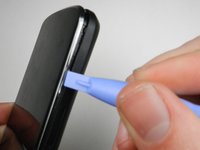
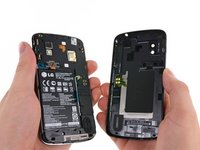
      • Gently open the back case by prying along the edge of the cover, starting at a corner of the phone and circling around the phone using a plastic opening tool.

      • The opening process may take a few minutes. The plastic will make a light snapping noise as the back cover separates from the rest of the phone.

      Ask FixBot

      Add Comment

    1. Nexus 4 Power and Volume Button Replacement, Power and Volume Button: step 4, image 1 of 2 Nexus 4 Power and Volume Button Replacement, Power and Volume Button: step 4, image 2 of 2
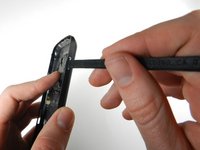
      • Holding the back case, gently push the power button in towards the center of the phone using a spudger.

      Ask FixBot

      Add Comment

    2. Nexus 4 Power and Volume Button Replacement: step 5, image 1 of 3 Nexus 4 Power and Volume Button Replacement: step 5, image 2 of 3 Nexus 4 Power and Volume Button Replacement: step 5, image 3 of 3
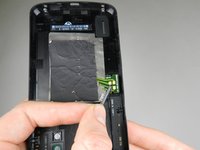
      • To remove the volume button, push the button in towards the center of the phone using a spudger.

      Ask FixBot

      Add Comment

Conclusion

To reassemble your device, follow these instructions in reverse order.

Cancel: I did not complete this guide.

16 other people completed this guide.

Kaitlyn Jones

Member since: 01/27/13

4,964 Reputation

8 Guides authored

Team

Cal Poly, Team 3-32, Amido Winter 2013 Member of Cal Poly, Team 3-32, Amido Winter 2013

CPSU-AMIDO-W13S3G32

4 Members

96 Guides authored

0 Guide Comments

Add Comment

View Statistics:

Past 24 Hours: 1

Past 7 Days: 13

Past 30 Days: 54

All Time: 30,443