Introduction
Your New Nintendo 2DS XL's battery may need to be replaced if the device doesn't turn on when you press the power button. The battery is directly accessible under the bottom panel. For more information, refer to our troubleshooting page.
What you need
-
-
-
Before you begin, power off the console and remove:
-
The stylus
-
Any game cartridge
-
The microSD card
 Ask FixBot
-
-
-
Use a tri‑point Y00 screwdriver to remove the four 6 mm‑long screws located at the four corners of the bottom panel.
-
-
-
-
Use a spudger to gently pry around the two short edges and front edge (with the stylus cut‑out) to release the clips securing the back cover.
-
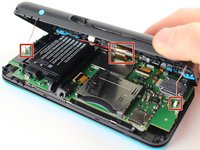
Swing the back cover open from its front edge to release the clips along the hinge edge. Don't remove it fully—three cables are connecting it to the motherboard (two on each side and one in the rear).
-
-
Tool used on this step:Tweezers$4.99
-
Use tweezers to disconnect the two cables that connect the rear buttons on either side to the motherboard by gently pulling them upwards.
-
Fold the back cover over the hinge edge, keeping the cable connected. Don't strain the cable.
-
-
-
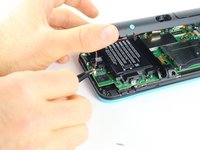
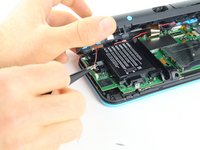
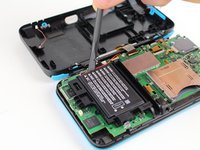
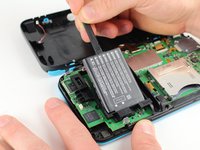
Use the flat end of a spudger to gently pry the battery out of its plastic enclosure.
-
-






To reassemble your device, follow these instructions in reverse order.
Cancel: I did not complete this guide.
50 other people completed this guide.

Team

Cal Poly, Team S18-G6, Forte Fall 2017 Member of Cal Poly, Team S18-G6, Forte Fall 2017
CPSU-FORTE-F17S18G6
5 Members
48 Guides authored
16 Guide Comments
CTR-003 Battery
Do I need to put a sticky pad on the new battery?
