
Nest Hello Casing and Faceplate Replacement

Daniel Moore and 3 other contributors
Last updated on May 27, 2020
Views: 4.1K
View statistics:
- Past 24 Hours:
- 3
- Past 7 Days:
- 28
- Past 30 Days:
- 96
- All Time:
- 4,143
Comments: 19
17 comments on steps, 2 guide comments.
Go to guide commentsCompleted: 0 1
No one has marked this guide "completed." Will you be the first?
1 person has marked this guide "completed." It's you — great job!
Favorites: 1 2
1 person has favorited (and subscribed to) this guide. Will you be next?
2 people have favorited (and subscribed to) this guide — including you!
Better Introduction
Improve this guide by completing or revising its introduction.
Introduction
Go to step 1 ↓This guide will show how to remove the faceplate and casing from the Nest Hello.
What you need
Tools
-
-
Spudger4.9


-
-
-
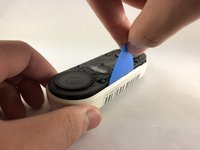
Insert the pick between the black faceplate and white casing of the Nest Hello.
-
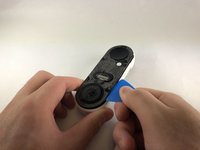
Pry the faceplate away from the device with the opening pick.
-
Completely remove the faceplate from the device, do not be afraid to pull hard.
 Ask FixBot
-
-
-
Peel back the cover stickers and use the Phillips #000 screwdriver to remove the four screws.
-
-
-
-
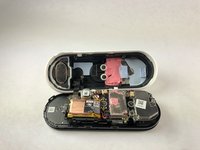
Insert opening pick between the white casing and the black internal circuitry and pry it out.
-
-


To reassemble your device, follow these instructions in reverse order.

Team

Embry-Riddle Aeronautical University, Team S1-G7, Cromer Twal Spring 2020 Member of Embry-Riddle Aeronautical University, Team S1-G7, Cromer Twal Spring 2020
ERAU-CROMER TWAL-S20S1G7
4 Members
84 Guides authored
2 Guide Comments
Are Replacement parts available anywhere? Can’t seem to find anything… thanks!
