Free Shipping on Domestic Orders $75+

Nest Dropcam Pro Mounting Clips Replacement

What you need

  1. Nest Dropcam Pro Mounting Clips Replacement, Outer Case: step 1, image 1 of 1
    • Press in the mounting clips on each side of the case to remove the camera from the mount.

    Ask FixBot

    Add Comment

  2. Nest Dropcam Pro Mounting Clips Replacement: step 2, image 1 of 2 Nest Dropcam Pro Mounting Clips Replacement: step 2, image 2 of 2
    • Using a Philips #0 screwdriver, remove the four 3 mm screws.

    Ask FixBot

    Add Comment

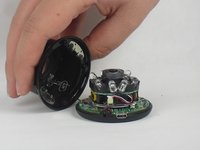
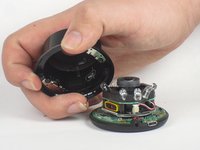
  3. Nest Dropcam Pro Mounting Clips Replacement: step 3, image 1 of 2 Nest Dropcam Pro Mounting Clips Replacement: step 3, image 2 of 2
    • Lift the front of the case slowly, as there is an antenna cable attached to the motherboard.

    • Carefully disconnect the antenna cable from the motherboard. You will feel this cable "pop" out of place when disconnected.

    Ask FixBot

    Add Comment

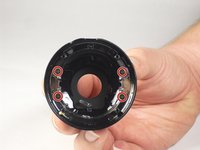
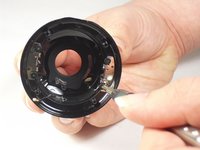
  4. Nest Dropcam Pro Mounting Clips Replacement, Mounting Clips: step 4, image 1 of 2 Nest Dropcam Pro Mounting Clips Replacement, Mounting Clips: step 4, image 2 of 2
    • Using a Philips #0 screwdriver, remove the four 4 mm screws that are attaching the mounting clips to the case.

    Ask FixBot

    Add Comment

  5. Nest Dropcam Pro Mounting Clips Replacement: step 5, image 1 of 1
    • Lift the mounting clips away from the case.

    Ask FixBot

    Add Comment

Conclusion

To reassemble your device, follow these instructions in reverse order.

Cancel: I did not complete this guide.

David Foens

Member since: 09/03/15

896 Reputation

6 Guides authored

Team

USF Tampa, Team 15-4, Blackwell Fall 2015 Member of USF Tampa, Team 15-4, Blackwell Fall 2015

USFT-BLACKWELL-F15S15G4

3 Members

12 Guides authored

0 Guide Comments

Add Comment

View Statistics:

Past 24 Hours: 0

Past 7 Days: 7

Past 30 Days: 24

All Time: 1,535