Introduction
This guide will help you disassemble your Neato XV-21 and replace the fan.
What you need
-
-
-
Flip the Neato on its back so the bottom is exposed
-
Unscrew the seven screws.
 Ask FixBot
-
-
-
-
The Neato's core components are now exposed and ready to be cleaned and/or replaced.
-
-
-
-
-
Pinch and pull the white connector to disconnect the battery from the device
-
Lift and remove the battery from the cavity
-
-
-
-
-
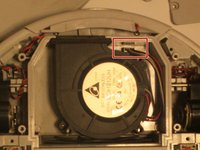
Pinch the white connectors to disconnect the fan from the robot, as previously done with the batteries
-
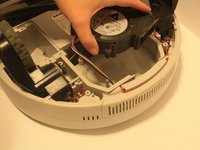
Once the wires are disconnected lift the fan from the cavity
-
-
-
Once the fan has been removed you can take a damp cloth and clean the cavity before attaching the new device
-
-



To reassemble your device, follow these instructions in reverse order.
Cancel: I did not complete this guide.
3 other people completed this guide.

Team

University of North Texas, Team S2-G3, Thompson Fall 2017 Member of University of North Texas, Team S2-G3, Thompson Fall 2017
UNT-THOMPSON-F17S2G3
4 Members
72 Guides authored
