
Nanit Pro N301 Motherboard Replacement

Derek Maue and 3 other contributors
Last updated on Jun 26, 2024
Views: 891
View statistics:
- Past 24 Hours:
- 1
- Past 7 Days:
- 18
- Past 30 Days:
- 72
- All Time:
- 891
Comments: 1
1 guide comment.
Go to guide commentsCompleted: 2 3
2 people have marked this guide "completed." Will you be next?
3 people have marked this guide "completed." Including you — great job!
Favorites: 0 1
No one has favorited (and subscribed to) this guide. Will you be the first?
1 person has favorited (and subscribed to) this guide — and that's you!
Needs Better Images
Better photos will improve this guide. Help out by taking, editing, or uploading new ones!
Needs More Images
A few more images would make this guide's procedures crystal clear.
Missing Steps
Oops! This guide is currently missing one or more important steps.
Introduction
Go to step 1 ↓If your Nanit Pro N301 is not turning on or functioning correctly, use this guide to replace the motherboard. Some of the pieces are very small so make sure you have a tool that can grab tiny materials if you are unable to do so with your fingers. Make your device is not plugged in and connected to a power source during the repair.
What you need
Parts
Tools


-
-
-
Insert an opening pick into the seam between the front and rear case.
-
Slide the opening pick around the perimeter of the camera until all of the retaining clips are released.
-
Separate the front and rear case.
 Ask FixBot
-
-
-
Remove the four 4 mm T6 Torx screws from each corner of the circuit board.
-
Lift the circuit board out of the chassis.
-
-
-
-
Use tweezers to gently lift the two additional circuit boards out of the housing.
-
-
-
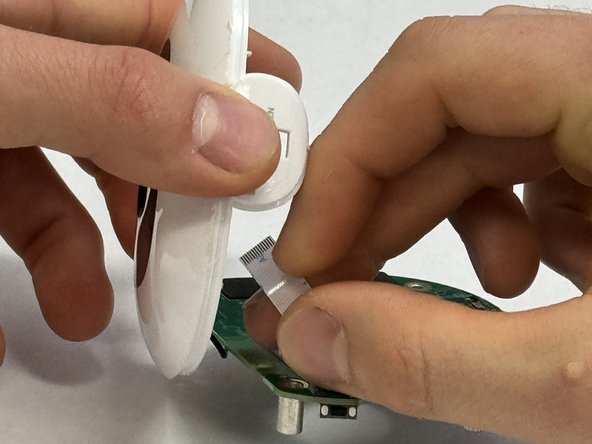
Disconnect the battery ribbon cable strip from the rear case.
-
Remove the motherboard.
-
-


To reassemble your device, follow these instructions in reverse order.
Cancel: I did not complete this guide.
2 other people completed this guide.

Team

IUPUI, Team 3-1, Harley Spring 2024 Member of IUPUI, Team 3-1, Harley Spring 2024
IUPUI-HARLEY-S24S3G1
3 Members
36 Guides authored
