Nabi Jr Battery Replacement

Jimmy Nguyen and 4 other contributors
Last updated on Jun 22, 2015
Views: 13K
View statistics:
- Past 24 Hours:
- 7
- Past 7 Days:
- 22
- Past 30 Days:
- 111
- All Time:
- 12,547
Comments: 7
7 guide comments.
Go to guide commentsCompleted: 4 5
4 people have marked this guide "completed." Will you be next?
5 people have marked this guide "completed." Including you — great job!
Favorites: 0 1
No one has favorited (and subscribed to) this guide. Will you be the first?
1 person has favorited (and subscribed to) this guide — and that's you!
Better Introduction
Improve this guide by completing or revising its introduction.
What you need
Tools


-
-
-
Remove the red rubber case from the device. This should come off with ease.
 Ask FixBot
-
-
-
Turn the device so the screen is facing away from you.
-
Using a philips head, size #00, screwdriver, remove the screws in each corner of the plastic casing.(total of 4 screws)
-
-
-
After loosening the back cover, remove it from the device so you can get at the innards.
-
-
-
-
-
-
Replace the old battery with the new one
-
Solder the wires of the new battery into the pads on the motherboard
-
-
-
Once the wires are fully soldered, put the new battery back to the initial position
-
Close the case by putting the back cover back on the device
-
-
-
Once the back cover is on, screw in the four screws that you had taken off in the beginning
-
Put the red rubber casing back on.
-


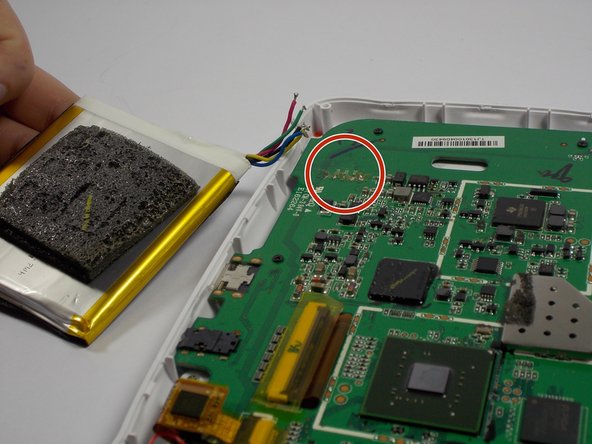


If all the steps were followed correctly, the device should be fully closed and ready to go
Cancel: I did not complete this guide.
4 other people completed this guide.

Team

UMass Dartmouth, Team 4-3, Vijaybhaskar Spring 2015 Member of UMass Dartmouth, Team 4-3, Vijaybhaskar Spring 2015
UMASSD-VIJAYBHASKAR-S15S4G3
3 Members
72 Guides authored
7 Guide Comments
Thank you for sharing the idea ,but I need that NABI JR battery. So ,where from I can purchase it .
I have seen them on ebay but it's easier to find a Nabi 2 battery on ebay. The Nabi 2 battery is quite a bit larger but with a very minor mod to the Nabi Jr. the Nabi 2 battery will fit and give you a much longer run time from a single charge.
My old Nabi jr battery is a plug in with 2 reds 1 white and 2 black wires. My new Cameron sino battery is blue green red yellow black. What is the order to resolder them.
I have the same problem with the problem of the replacement battery not having the same wiring configuration or plug. Did you ever get this resolved?
