Free Shipping on Domestic Orders $75+

Nabi Big Tab HD24 Battery Replacement

What you need

  1. Nabi Big Tab HD24 Battery Replacement, Back Assembly: step 1, image 1 of 1
    • Ensure that the tablet is facing you with the screen on the table.

    • Locate the four red rubber stops at the corners.

    Ask FixBot
  2. Nabi Big Tab HD24 Battery Replacement: step 2, image 1 of 1
    • Use your fingers to carefully peel them off the device to reveal the screws underneath.

    Ask FixBot
  3. Nabi Big Tab HD24 Battery Replacement: step 3, image 1 of 1
    • Use a Phillips #1 screwdriver to remove the 9.5 mm screw in each of the four corners.

    Ask FixBot
  4. Nabi Big Tab HD24 Battery Replacement: step 4, image 1 of 1
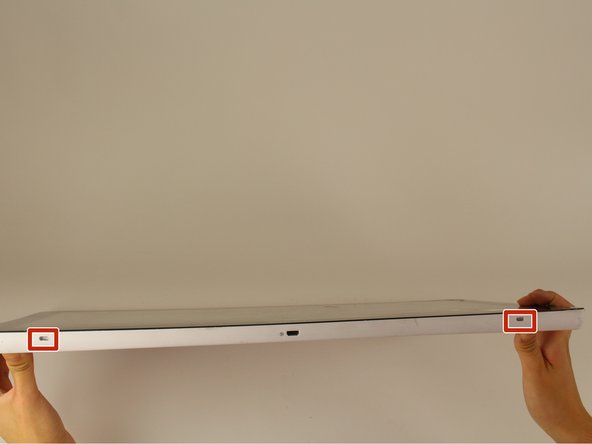
    • Flip the tablet over such that the screen is facing upwards.

    • Locate the the 4 small openings on the sides of the tablet.

    • There should be 2 on the bottom of the tablet, 1 on each side of the tablet viewing it from the front as if you were using it.

    • Do not confuse the openings with the charging port or the USB ports. The openings will be labelled with an icon of a small fan, the Nabi logo.

    Ask FixBot
  5. Nabi Big Tab HD24 Battery Replacement: step 5, image 1 of 1
    • Insert a metal spudger into one of the openings and carefully pop the device open by applying a steady downward force.

    • Repeat for the other three openings.

    Ask FixBot
  6. Nabi Big Tab HD24 Battery Replacement: step 6, image 1 of 2 Nabi Big Tab HD24 Battery Replacement: step 6, image 2 of 2
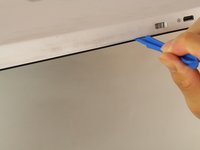
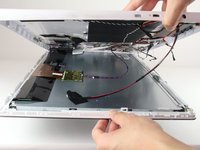
    • Flip the device over so that the back assembly is facing you.

    • Use a plastic opening tool to carefully pry open the device from its hinges.

    • Take care when opening the device as there are cables running internally that are connected to both the front and the back assemblies.

    Ask FixBot
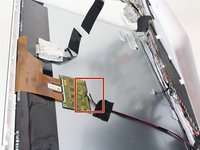
  7. Nabi Big Tab HD24 Battery Replacement: step 7, image 1 of 2 Nabi Big Tab HD24 Battery Replacement: step 7, image 2 of 2
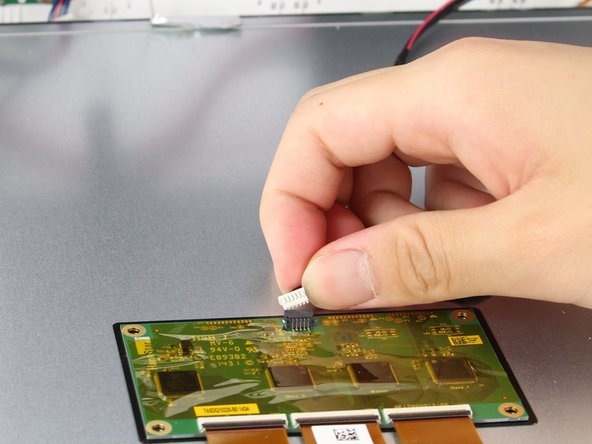
    • Locate the white port that connects the back panel to the circuit board on the back of the display.

    • Carefully pull the plastic connector straight out.

    Ask FixBot
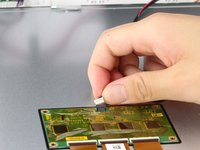
  8. Nabi Big Tab HD24 Battery Replacement: step 8, image 1 of 1
    • Be careful of the aluminum foil tape, as it can easily rip.

    • Carefully lift up the aluminum foil tape with your fingers so that the ribbon connector reveals itself.

    • Do not try to pull the ribbon cables off the screen as there is a plastic piece surrounding the ribbon cables glued onto the metal display.

    Ask FixBot
  9. Nabi Big Tab HD24 Battery Replacement: step 9, image 1 of 1
    • Firmly press the two switches located on the sides of the connector and disconnect the connector from its connections.

    • Leave the connector disconnected but still intact with the metal display.

    Ask FixBot
  10. Nabi Big Tab HD24 Battery Replacement: step 10, image 1 of 1
    • Use a plastic opening tool and carefully push it underneath the grey plastic case surrounding the ribbon cable.

    • Apply a downward force to carefully peel the grey plastic off of the metal display.

    Ask FixBot
  11. Nabi Big Tab HD24 Battery Replacement: step 11, image 1 of 1
    • Locate the two cables running on both sides of the device found at the bottom side of the screen.

    Ask FixBot
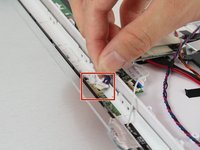
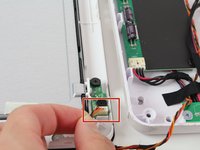
  12. Nabi Big Tab HD24 Battery Replacement: step 12, image 1 of 2 Nabi Big Tab HD24 Battery Replacement: step 12, image 2 of 2
    • Carefully grab both sides of the white plastic piece with your fingers and gently pull directly upward.

    • Do not pull from the red and black cable as it is not very sturdy and may come undone from the connector.

    Ask FixBot
  13. Nabi Big Tab HD24 Battery Replacement, Battery: step 13, image 1 of 1
    • Locate the battery, the large black rectangular component, on the side with all of the circuit boards.

    • The battery is a McNair Li-ion Polymer Battery Model #: mlp2462113-4s.

    Ask FixBot
  14. Nabi Big Tab HD24 Battery Replacement: step 14, image 1 of 1
    • Locate the bundle of wires connecting the battery to the power regulator, which is right next to the battery.

    • One bundle of wire contains two black, one yellow/white, and three red wires in this bundle, while the other bundle is a twisted black and white wire taped alongside the previous one.

    Ask FixBot
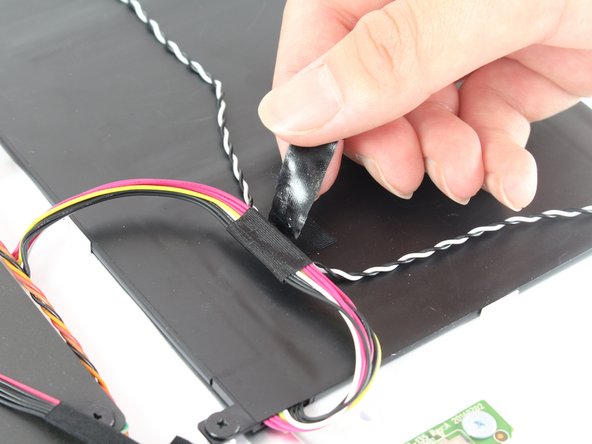
  15. Nabi Big Tab HD24 Battery Replacement: step 15, image 1 of 1
    • Remove the black tape holding down the two bundles of wire.

    • The black and white wire bundle does not connect to the battery, so moving it out of the way will make taking the battery out easier.

    Ask FixBot
  16. Nabi Big Tab HD24 Battery Replacement: step 16, image 1 of 1
    • Locate where the red/black/yellow wire bundle connects to the power adapter.

    Ask FixBot
  17. Nabi Big Tab HD24 Battery Replacement: step 17, image 1 of 1
    • Disconnect the wires from the power regulator by pulling the white connector straight out.

    Ask FixBot
  18. Nabi Big Tab HD24 Battery Replacement: step 18, image 1 of 1
    • Unscrew the six black 4.5 mm Phillips #1 screws holding the battery in place.

    • Lift out the battery and replace with your new one.

    Ask FixBot
Conclusion

To reassemble your device, follow these instructions in reverse order.

11 other people completed this guide.

Kevin Garcia

Member since: 10/05/16

294 Reputation

2 Guides authored

Team

Cal Poly, Team 4-1, Livingston Fall 2016 Member of Cal Poly, Team 4-1, Livingston Fall 2016

CPSU-LIVINGSTON-F16S4G1

4 Members

14 Guides authored

7 Guide Comments

Where can I buy a replacement battery?

McNair Li-ion Polymer Battery Model #: mlp2462113-4s.

Best,

Pat

pat - Reply Share

Can you buy a replacement battery?

Dougie85fresh - Reply Share

Has anyone had success finding a replacement battery?

William Smith - Reply Share

Any thoughts on an upgraded battery instead of stock replacement?

Chris Fisher - Reply Share

I tried replacing…replacing cracked screen and then never did figure out how to be able to remove back other than to lift front and back apart…apart knowing what u can and continue disconnect and how isn't explained here…

Now I still need battery replaced and a new screen

Tonni Brende - Reply Share

Add Comment

View Statistics:

Past 24 Hours: 1

Past 7 Days: 11

Past 30 Days: 61

All Time: 9,186