
Munchkinz Battery Replacement

Hee Jin Cho and
Last updated on Jun 18, 2015
Views: 1K
View statistics:
- Past 24 Hours:
- 3
- Past 7 Days:
- 14
- Past 30 Days:
- 87
- All Time:
- 1,035
Comments: 0
No one has left comments on this guide. Will you be first?
Go to guide commentsCompleted: 0 1
No one has marked this guide "completed." Will you be the first?
1 person has marked this guide "completed." It's you — great job!
Favorites: 0 1
No one has favorited (and subscribed to) this guide. Will you be the first?
1 person has favorited (and subscribed to) this guide — and that's you!
What you need
Tools
-
-
Spudger4.9


Introduction
Go to step 1 ↓Display how to remove the battery.
-
-
-
Insert spudger into the USB Micro slot and pry the case apart.
 Ask FixBot
-
-
-
Slide the wide plastic opening tool across the seem, separating it if you can't pry the device open using just the spudger.
-
-
-
-
-
-
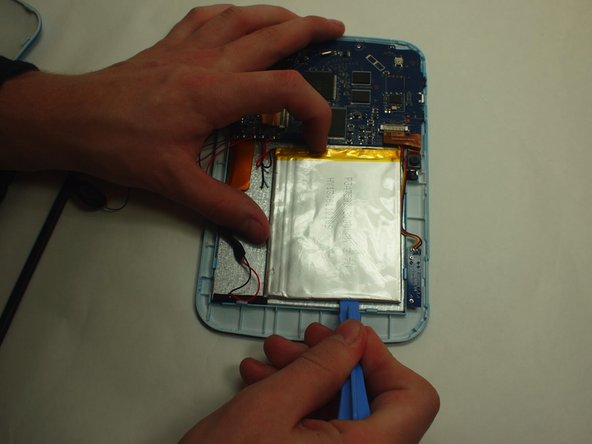
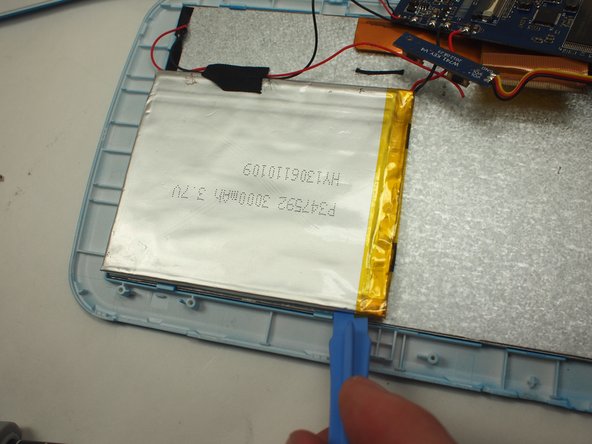
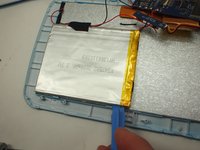
Use the wide plastic opening tool to slowly pry each side of the battery up.
-
-
-
Use the Soldering Iron to disconnect the each cable.
-
-



To reassemble your device, follow these instructions in reverse order.

Team

UW Tacoma, Team 3-6, Rose Winter 2015 Member of UW Tacoma, Team 3-6, Rose Winter 2015
UWT-ROSE-W15S3G6
3 Members
84 Guides authored
