
Motorola i710 Back Casing Replacement

Carson Meena and 5 other contributors
Last updated on Jan 28, 2014
Views: 649
View statistics:
- Past 24 Hours:
- 1
- Past 7 Days:
- 6
- Past 30 Days:
- 35
- All Time:
- 649
Comments: 0
No one has left comments on this guide. Will you be first?
Go to guide commentsCompleted: 0 1
No one has marked this guide "completed." Will you be the first?
1 person has marked this guide "completed." It's you — great job!
Favorites: 0 1
No one has favorited (and subscribed to) this guide. Will you be the first?
1 person has favorited (and subscribed to) this guide — and that's you!
Introduction
Go to step 1 ↓Once the battery and battery cover have been removed, the case back cover can be separated from the rest of the case, as shown in this guide.
What you need
Tools

-
-
-
Slide the cover release button towards the bottom of the phone
-
Once the battery cover pops up, slide the cover towards the top of the phone and lift up.
 Ask FixBot
-
-
-
-
-
-
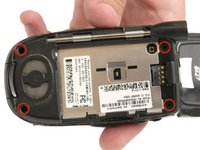
With a T5 screwdriver, unscrew the four T5 sized screws that hold the case back cover onto the rest of the case.
-
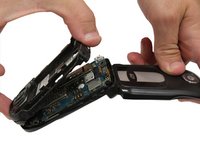
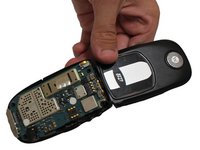
Remove the plastic case back cover by gently pulling it away from the body of the phone, starting at one edge and working your way down to the other.
-
-


To reassemble your device, follow these instructions in reverse order.

Team

Clemson, Team 14-2, Benson Fall 2012 Member of Clemson, Team 14-2, Benson Fall 2012
CLEM-BENSON-F12S14G2
4 Members
144 Guides authored
