
Motorola V60c Motherboard Replacement

Ryan Kuroiwa and 7 other contributors
Last updated on Jul 19, 2023
Views: 2.7K
View statistics:
- Past 24 Hours:
- 2
- Past 7 Days:
- 13
- Past 30 Days:
- 38
- All Time:
- 2,715
Comments: 1
1 comment on steps.
Completed: 0 1
No one has marked this guide "completed." Will you be the first?
1 person has marked this guide "completed." It's you — great job!
Favorites: 0 1
No one has favorited (and subscribed to) this guide. Will you be the first?
1 person has favorited (and subscribed to) this guide — and that's you!
Bullets!
Better coordination with markups and the color/type of bullets will help make this guide more clear!
Better Introduction
Improve this guide by completing or revising its introduction.
Missing Details
Some of this guide's details are missing. Help users by adding tools, difficulty, or time.
Introduction
Go to step 1 ↓How to replace the motherboard of your Motorola V60c phone.
What you need


-
-
-
Hold battery from both sides at the bottom.
-
Push upwards and gently lift to remove.
-
-
-
-
Remove 4 screws from corners using T-6 screwdriver.
-
NOTE: Make sure screws return to correct place when reassembling.
-
-
-
-
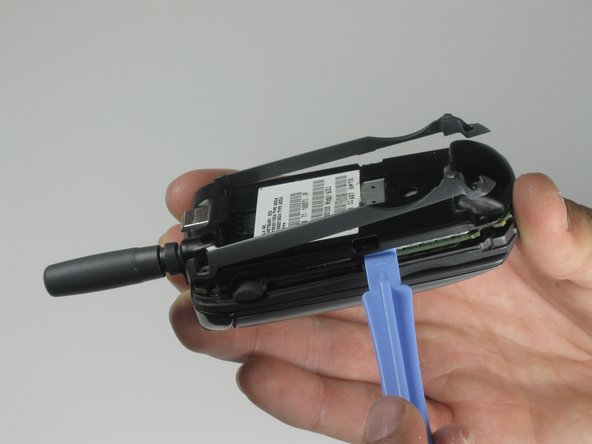
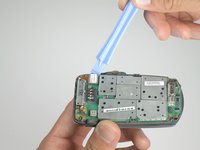
Use a plastic opening tool to gently remove the orange ribbon cable.
-
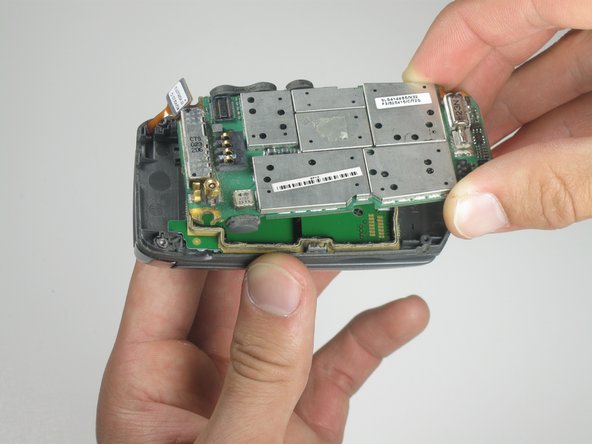
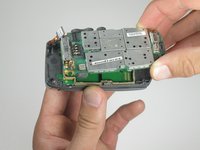
Lift up the main logic board to remove.
-
-


 Ask FixBot




To reassemble your device, follow these instructions in reverse order.

Team

Cal Poly, Team 25-86, Amido Spring 2010 Member of Cal Poly, Team 25-86, Amido Spring 2010
CPSU-AMIDO-S10S25G86
5 Members
60 Guides authored
