Free Shipping on Domestic Orders $75+

Motorola V557 Faceplate Replacement

What you need

  1. Motorola V557 Faceplate Replacement, Faceplate: step 1, image 1 of 3 Motorola V557 Faceplate Replacement, Faceplate: step 1, image 2 of 3 Motorola V557 Faceplate Replacement, Faceplate: step 1, image 3 of 3
    • Remove the four rubber stoppers from around the screen with a pin to reveal four screws.

    Ask FixBot

    Add Comment

  2. Motorola V557 Faceplate Replacement: step 2, image 1 of 2 Motorola V557 Faceplate Replacement: step 2, image 2 of 2
    • Remove the four 3.8 mm T-6 Torx screws.

    Ask FixBot

    Add Comment

  3. Motorola V557 Faceplate Replacement: step 3, image 1 of 2 Motorola V557 Faceplate Replacement: step 3, image 2 of 2
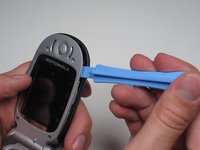
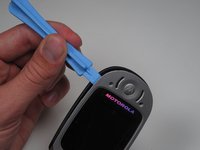
    • Separate the cover from the edges using a plastic opening tool.

    Ask FixBot

    Add Comment

  4. Motorola V557 Faceplate Replacement: step 4, image 1 of 2 Motorola V557 Faceplate Replacement: step 4, image 2 of 2
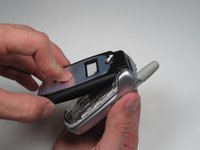
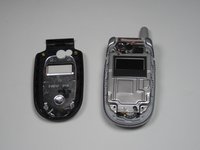
    • With the edges separated, close the phone and lift off the faceplate with your fingers.

    Ask FixBot

    Add Comment

Conclusion

To reassemble your device, follow these instructions in reverse order.

Cancel: I did not complete this guide.

Blair Frandeen

Member since: 10/02/10

19 Reputation

4 Guides authored

Team

Cal Poly, Team 7-50, Amido Fall 2010 Member of Cal Poly, Team 7-50, Amido Fall 2010

CPSU-AMIDO-F10S7G50

4 Members

36 Guides authored

0 Guide Comments

Add Comment

View Statistics:

Past 24 Hours: 2

Past 7 Days: 9

Past 30 Days: 43

All Time: 2,330