Introduction
The Battery Replacement Guide provides a list of the tools and parts that you need to replace the battery on the Motorola SLVR L9. As you begin the replacement process, look for the pictures provided with each step to better guide you.
What you need
-
-
-
-
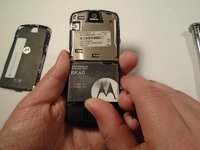
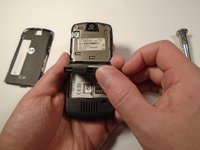
Press down on the silver battery cover latch located at the top of the phone.
-
Pull the battery cover down and away from the latch; then lift it up to remove the battery cover.
-


 Ask FixBot


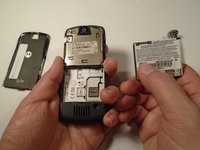
To reassemble your device, follow these instructions in reverse order.
Cancel: I did not complete this guide.
One other person completed this guide.

Team

Sam Houston State, Team 1-5, Blackburne Fall 2015 Member of Sam Houston State, Team 1-5, Blackburne Fall 2015
SHSU-BLACKBURNE-F15S1G5
3 Members
60 Guides authored
