Free Shipping on Domestic Orders $75+

Motorola Razr V3c Keypad Cover (CDMA) Replacement

What you need

  1. Motorola Razr V3c Keypad Cover (CDMA) Replacement, Battery (CDMA): step 1, image 1 of 3 Motorola Razr V3c Keypad Cover (CDMA) Replacement, Battery (CDMA): step 1, image 2 of 3 Motorola Razr V3c Keypad Cover (CDMA) Replacement, Battery (CDMA): step 1, image 3 of 3
    • Press down on the the rear panel release button while simultaneously prying the rear panel straight away from the V3c.

    • Lift and remove the rear panel away from the V3c.

    Ask FixBot

    Add Comment

  2. Motorola Razr V3c Keypad Cover (CDMA) Replacement: step 2, image 1 of 2 Motorola Razr V3c Keypad Cover (CDMA) Replacement: step 2, image 2 of 2
    • Remove the battery by pushing in the top of the battery and lifting it away from the phone.

    Ask FixBot

    Add Comment

  3. Motorola Razr V3c Keypad Cover (CDMA) Replacement, Keypad Cover (CDMA): step 3, image 1 of 1
    • Remove the two T6 screws on the back of the phone.

    Ask FixBot

    Add Comment

  4. Motorola Razr V3c Keypad Cover (CDMA) Replacement: step 4, image 1 of 1
    • Use the plastic opening tool to pop the bottom part of the back case out.

    • The back case is connected to the phone with a ribbon cable; take care not to pull too hard or violently on the cable.

    Ask FixBot

    Add Comment

  5. Motorola Razr V3c Keypad Cover (CDMA) Replacement: step 5, image 1 of 1
    • Gently pull back case out and lay it over to the side.

    • Now pull up on the cable attaching the back case to the phone body to separate the two parts. Lay the back case aside for now.

    Ask FixBot

    Add Comment

  6. Motorola Razr V3c Keypad Cover (CDMA) Replacement: step 6, image 1 of 1
    • Remove the two T6 screws securing the plastic speaker cover to the phone.

    Ask FixBot

    Add Comment

  7. Motorola Razr V3c Keypad Cover (CDMA) Replacement: step 7, image 1 of 1
    • Pull off the lower front casing.

    • The metal shield will come off when the lower front casing is removed. Make sure to replace this when reassembling the lower bottom casing.

    Ask FixBot

    Add Comment

  8. Motorola Razr V3c Keypad Cover (CDMA) Replacement: step 8, image 1 of 1
    • Pull the silver plastic cover down away from the rest of the phone.

    Ask FixBot

    Add Comment

  9. Motorola Razr V3c Keypad Cover (CDMA) Replacement: step 9, image 1 of 1
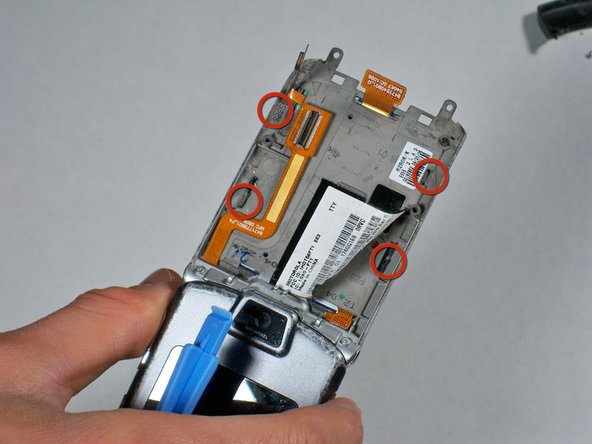
    • Push the metal tabs along the perimeter of the device through towards the keyboard with your fingers.

    Ask FixBot

    Add Comment

  10. Motorola Razr V3c Keypad Cover (CDMA) Replacement: step 10, image 1 of 1
    • Gently lift up on the keypad with the plastic opening tool while being careful not to bend the thin metal portion lining the keypad.

    Ask FixBot

    Add Comment

Conclusion

To reassemble your device, follow these instructions in reverse order.

Cancel: I did not complete this guide.

2 other people completed this guide.

krisko

Member since: 01/14/10

104 Reputation

4 Guides authored

Team

Cal Poly, Team 11-4, Forte Winter 2010 Member of Cal Poly, Team 11-4, Forte Winter 2010

CPSU-FORTE-W10S11G4

3 Members

16 Guides authored

0 Guide Comments

Add Comment

View Statistics:

Past 24 Hours: 2

Past 7 Days: 8

Past 30 Days: 33

All Time: 7,539