
Motorola RAZR V3i Battery Replacement

Nigel and 17 other contributors
Last updated on Apr 13, 2020
Views: 9K
View statistics:
- Past 24 Hours:
- 3
- Past 7 Days:
- 35
- Past 30 Days:
- 163
- All Time:
- 8,963
Comments: 0
No one has left comments on this guide. Will you be first?
Go to guide commentsCompleted: 5 6
5 people have marked this guide "completed." Will you be next?
6 people have marked this guide "completed." Including you — great job!
Favorites: 0 1
No one has favorited (and subscribed to) this guide. Will you be the first?
1 person has favorited (and subscribed to) this guide — and that's you!
Introduction
Go to step 1 ↓This is a guide for replacing the battery of a Motorola RAZR V3i. With time, the battery life decreases and cannot work as efficiently as it did when first purchased. Replace your battery when your phone is no longer holding a charge, when it is dying rapidly after minimal change in use, and/or if the battery is swollen. Make sure the battery is completely discharged before attempting to do this replacement. Be careful to not puncture the battery, under any circumstances. If the battery is swollen, take extra precautions, as this is a sign of a damaged battery. Use protective equipment such as eye protection and gloves. Do not expose the battery to heat or moisture. Consider professional help if you have any issues.
What you need
Parts
-
-
-
Make sure the phone is turned off by holding down the red End Call/Power button until the phone shuts off.
 Ask FixBot
-
-
-
Close the phone and find the battery cover button, located on the backside of the phone underneath the hinge.
-
Using your finger, press down on the button to release the back cover. Then, lift the cover and remove it from the phone completely.
-
-
-
-
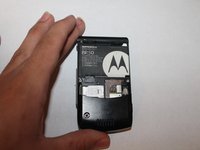
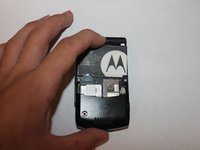
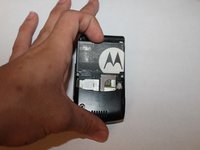
Remove the battery by pushing down on it from the top while gently pulling it outwards.
-
-


Cancel: I did not complete this guide.
5 other people completed this guide.

Team

Cuesta, Team 1-5, Zipperian Fall 2011 Member of Cuesta, Team 1-5, Zipperian Fall 2011
CUESTA-ZIPPERIAN-F11S1G5
1 Member
24 Guides authored
