
Motorola Moto G4 Play Screen Replacement

Michael Cottone and 3 other contributors
Last updated on Mar 21, 2025
Views: 6.4K
View statistics:
- Past 24 Hours:
- 3
- Past 7 Days:
- 19
- Past 30 Days:
- 80
- All Time:
- 6,395
Comments: 4
4 guide comments.
Go to guide commentsCompleted: 11 12
11 people have marked this guide "completed." Will you be next?
12 people have marked this guide "completed." Including you — great job!
Favorites: 2 3
2 people have favorited (and subscribed to) this guide. Will you be next?
3 people have favorited (and subscribed to) this guide — including you!
Community-Contributed Guide
An awesome member of our community made this guide. It was not created by iFixit staff.
Introduction
Go to step 1 ↓Before you begin, download the Software Fix app to backup your device and diagnose whether your problem is software or hardware related.
What you need
Tools
-
Spudger4.9
-


-
-
-
remove 16 phillips 00 screws
-
the two screws on either side of the battery (red color on thread) are shorter than the other screws (blue color on thread)
-
don't forget this one hiding underneath this sticker
-
no screw here
-
remove the inner back plate
-
-
-
disconnect antenna cable from motherboard with a spudger.
-
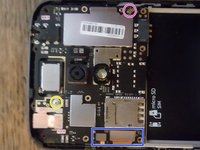
disconnect screen and digitiser cables with a spudger.
-
remove rear facing camera with a spudger
-
remove phillips 00 screw
-
Remove motherboard. this cable is still connected, you must disconnect it as you remove the motherboard.
-
-
-
-
disconnect antenna and data cable
-
remove philips 00 screws
-
Remove usb board and vibrator together.
-
-
-
Peel off black sticker under battery compartment.
-
peel off data cable
-
remove antenna wire
-
remove speaker
-

 Ask FixBot




To reassemble your device, follow these instructions in reverse order.
Cancel: I did not complete this guide.
11 other people completed this guide.

Team

4 Guide Comments
what if the new screen does not turn on or light up when you turn the phone on??? what part is causing that issue??
I’ve just wrapped up an abortive attempt to replace the screen on a friend’s G4 Play. It was aborted because the screen I bought off of ebay has only one digitizer connection on the upper left of the screen but my friend’s model has the two connections pictured in step 4 of this procedure. I can’t find an XT1601 screen on ebay or aliexpress or anywhere else that sports the twin connectors. What model of phone was this? Any clues on how to track this down?
@jrhooker that’s the button cable
good steps Michael + my name is Michael too
