Free Shipping on Domestic Orders $75+

Motorola Moto 360 3rd Gen Power Button Replacement

What you need

    1. Motorola Moto 360 3rd Gen Power Button Replacement, Lower Case: step 1, image 1 of 2 Motorola Moto 360 3rd Gen Power Button Replacement, Lower Case: step 1, image 2 of 2
      Tool used on this step:
      Halberd Spudger
      $2.99
      Buy
      • Use a T4 Torx screwdriver to remove the four 4.2 mm screws securing the lower case.

      • Gently pry the case open with a halberd spudger if the case will not release after removing the bolts.

      • Do not remove the lower case completely yet; this could damage cables connected to the lower case.

      Ask FixBot

      Add Comment

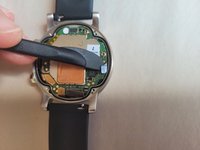
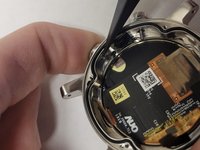
    2. Motorola Moto 360 3rd Gen Power Button Replacement: step 2, image 1 of 1
      • Raise the cover without straining the connected ribbon cable.

      • Disconnect the ribbon cable from the motherboard with a halberd spudger.

      Ask FixBot

      Add Comment

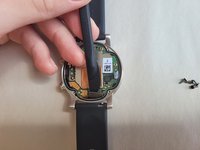
    1. Motorola Moto 360 3rd Gen Power Button Replacement, Power Button: step 3, image 1 of 2 Motorola Moto 360 3rd Gen Power Button Replacement, Power Button: step 3, image 2 of 2
      • Disconnect the right (small, black head) and bottom right ribbons (wide, orange head).

      • No need to disconnect the left or bottom left ribbons.

      Ask FixBot

      Add Comment

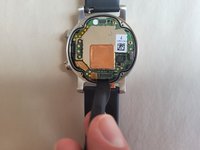
    2. Motorola Moto 360 3rd Gen Power Button Replacement: step 4, image 1 of 3 Motorola Moto 360 3rd Gen Power Button Replacement: step 4, image 2 of 3 Motorola Moto 360 3rd Gen Power Button Replacement: step 4, image 3 of 3
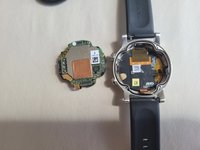
      • Gently remove the motherboard using the spudger tool.

      • The best area to pry is at the bottom of the motherboard, right under one of the ribbons that was just disconnected.

      Ask FixBot

      Add Comment

    3. Motorola Moto 360 3rd Gen Power Button Replacement: step 5, image 1 of 2 Motorola Moto 360 3rd Gen Power Button Replacement: step 5, image 2 of 2
      Tool used on this step:
      Tweezers
      $4.99
      Buy
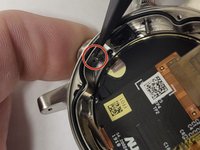
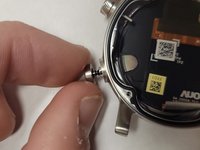
      • While pushing the power button inwards, use tweezers to remove the c-clamp.

      • The c-clamp is a very tiny object; be cautious of losing it.

      • Remove the power button.

      Ask FixBot

      Add Comment

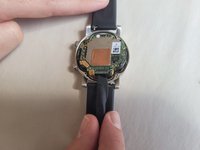
    4. Motorola Moto 360 3rd Gen Power Button Replacement: step 6, image 1 of 2 Motorola Moto 360 3rd Gen Power Button Replacement: step 6, image 2 of 2
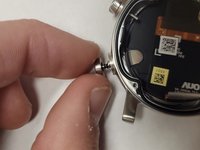
      • Insert the new power button in place of the old power button.

      • Attach the c-clamp back around the power button while it is being pushed inwards.

      Ask FixBot

      Add Comment

Conclusion

To reassemble your device, follow these instructions in reverse order.

Cancel: I did not complete this guide.

0 Guide Comments

Add Comment

View Statistics:

Past 24 Hours: 1

Past 7 Days: 3

Past 30 Days: 16

All Time: 390