Up to 20% off select tools
Free Shipping on Domestic Orders $75+

Motorola Edge Wide Angle Camera Replacement

Views: 621

View statistics:

Past 24 Hours:
7
Past 7 Days:
15
Past 30 Days:
68
All Time:
621
Comments: 2

2 comments on steps.

Completed: 0

No one has marked this guide "completed." Will you be the first?

Favorites: 0

No one has favorited (and subscribed to) this guide. Will you be the first?

Time Required: 45 minutes - 1 hour
Difficulty: Moderate
Motorola Edge Wide Angle Camera Replacement

What you need

Parts

Tools

Introduction

Go to step 1 ↓

Follow this guide to remove and replace the wide angle camera on a Motorola Edge.

Before you begin, download the Software Fix app to backup your device and diagnose whether your problem is software or hardware related.

For your safety, discharge the battery below 25% before disassembling your phone. This reduces the risk of fire if the battery is accidentally damaged during the repair. If your battery is swollen, take appropriate precautions.

    1. Motorola Edge Wide Angle Camera Replacement, Heat the bottom edge: step 1, image 1 of 1
      • Completely power off your phone before you begin.

      • Heat an iOpener, then apply it along the bottom edge of the back cover for two minutes.

      • A hair dryer, heat gun, or hot plate may also be used, but be careful not to overheat the phone because the display and internal battery are both susceptible to heat damage.

      Ask FixBot

      Add Comment

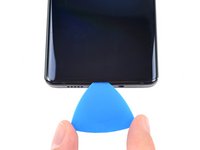
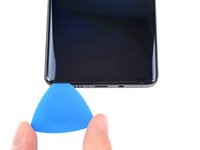
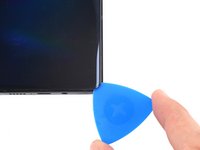
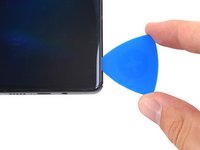
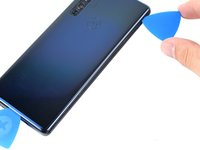
    2. Motorola Edge Wide Angle Camera Replacement, Separate the bottom adhesive: step 2, image 1 of 3 Motorola Edge Wide Angle Camera Replacement, Separate the bottom adhesive: step 2, image 2 of 3 Motorola Edge Wide Angle Camera Replacement, Separate the bottom adhesive: step 2, image 3 of 3
      • Apply a suction cup to the back of the phone, as close to the center of the bottom edge as possible.

      • Pull up on the suction cup with strong, steady force to create a gap between the back cover and the frame.

      • Depending on the age of your phone, this may be difficult. If you're having trouble, apply more heat to the edge and try again.

      • Insert an opening pick into the gap.

      Ask FixBot

      Add Comment

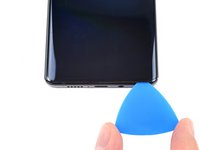
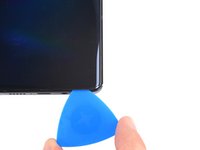
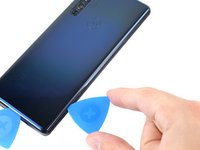
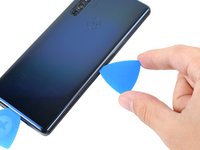
    3. Motorola Edge Wide Angle Camera Replacement, Slice the bottom adhesive: step 3, image 1 of 3 Motorola Edge Wide Angle Camera Replacement, Slice the bottom adhesive: step 3, image 2 of 3 Motorola Edge Wide Angle Camera Replacement, Slice the bottom adhesive: step 3, image 3 of 3
      • Slide the pick back and forth along the bottom edge to slice through the adhesive.

      • Leave the pick in to prevent the adhesive from resealing.

      Ask FixBot

      Add Comment

    4. Motorola Edge Wide Angle Camera Replacement, Heat the right edge: step 4, image 1 of 1
      • Apply a heated iOpener to the back cover's right edge for two minutes.

      Ask FixBot

      Add Comment

    5. Motorola Edge Wide Angle Camera Replacement, Separate the corner adhesive: step 5, image 1 of 3 Motorola Edge Wide Angle Camera Replacement, Separate the corner adhesive: step 5, image 2 of 3 Motorola Edge Wide Angle Camera Replacement, Separate the corner adhesive: step 5, image 3 of 3
      • Rotate the opening pick around the bottom-right corner of the phone.

      Ask FixBot

      Add Comment

    6. Motorola Edge Wide Angle Camera Replacement, Separate the right adhesive: step 6, image 1 of 3 Motorola Edge Wide Angle Camera Replacement, Separate the right adhesive: step 6, image 2 of 3 Motorola Edge Wide Angle Camera Replacement, Separate the right adhesive: step 6, image 3 of 3
      • Insert a new opening pick into the gap you just created.

      • Slide the pick along the right edge of the phone to separate the adhesive.

      • Repeat the heating, slicing, and leaving opening picks for the remaining edges of the device.

      Ask FixBot

      Add Comment

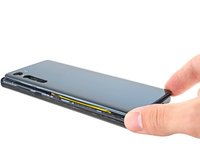
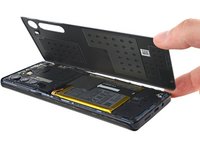
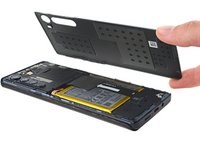
    7. Motorola Edge Wide Angle Camera Replacement, Remove the back cover: step 7, image 1 of 3 Motorola Edge Wide Angle Camera Replacement, Remove the back cover: step 7, image 2 of 3 Motorola Edge Wide Angle Camera Replacement, Remove the back cover: step 7, image 3 of 3
      • Remove the back cover, taking care not to damage the components inside the phone.

      Ask FixBot

      Add Comment

    1. Motorola Edge Wide Angle Camera Replacement, Remove the motherboard's screws: step 8, image 1 of 1
      • Use a T5 Torx screwdriver to remove the twelve 3.4 mm-long screws securing the motherboard cover.

      Ask FixBot

      Add Comment

    2. Motorola Edge Wide Angle Camera Replacement, Remove the motherboard cover: step 9, image 1 of 3 Motorola Edge Wide Angle Camera Replacement, Remove the motherboard cover: step 9, image 2 of 3 Motorola Edge Wide Angle Camera Replacement, Remove the motherboard cover: step 9, image 3 of 3
      Tool used on this step:
      Tweezers
      $4.99
      Buy
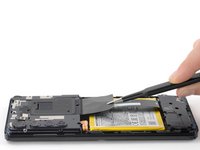
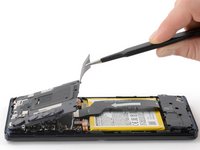
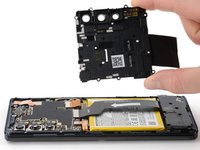
      • Use a pair of blunt tweezers or your fingers to lift up and remove the motherboard cover.

      • The motherboard cover also contains the phone's flash.

      Ask FixBot

      Add Comment

    1. Motorola Edge Wide Angle Camera Replacement, Disconnect the battery cable's press connector: step 10, image 1 of 2 Motorola Edge Wide Angle Camera Replacement, Disconnect the battery cable's press connector: step 10, image 2 of 2
      • Use a spudger to pry up and disconnect the battery cable's press connector from the motherboard.

      • To re-attach press connectors like this one, carefully align and press down on one side until it clicks into place, then repeat on the other side. Don't press down on the middle. If the connector is misaligned, the pins can bend, causing permanent damage.

      Ask FixBot

      Add Comment

    1. Motorola Edge Wide Angle Camera Replacement, Remove the wide angle camera's press connector: step 11, image 1 of 3 Motorola Edge Wide Angle Camera Replacement, Remove the wide angle camera's press connector: step 11, image 2 of 3 Motorola Edge Wide Angle Camera Replacement, Remove the wide angle camera's press connector: step 11, image 3 of 3
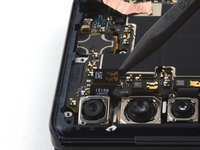
      • Use a spudger to pry up the wide angle camera cable's press connector and disconnect it from the motherboard.

      • Remove the wide angle camera.

      Ask FixBot

      Add Comment

Conclusion

To reassemble your device, follow these instructions in reverse order.

For optimal performance, calibrate your newly installed battery after completing this guide.

Take your e-waste to an R2 or e-Stewards certified recycler.

Repair didn’t go as planned? Try some basic troubleshooting, or ask our Answers Community for help.

Compare your new replacement part to the original part—you may need to transfer remaining components or remove adhesive backings from the new part before you install it.

Cancel: I did not complete this guide.

Author

with

Jennifer Berg

Member since: 03/21/22

2,896 Reputation

24 Guides authored

0 Guide Comments

Add Comment

View Statistics:

Past 24 Hours: 7

Past 7 Days: 15

Past 30 Days: 68

All Time: 621