Free Shipping on Domestic Orders $75+

Motorola Edge Fingerprint Sensor Replacement

What you need

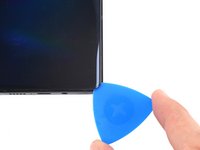
  1. Motorola Edge Fingerprint Sensor Replacement, Find the SIM tray: step 1, image 1 of 1
    • Find the SIM tray located at the top of the phone.

    Ask FixBot
    Add Comment

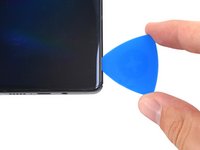
  2. Motorola Edge Fingerprint Sensor Replacement, Eject the SIM tray: step 2, image 1 of 2 Motorola Edge Fingerprint Sensor Replacement, Eject the SIM tray: step 2, image 2 of 2
    • Insert a SIM eject tool or SIM eject bit into the small hole in the SIM card tray.

    • If the tool you're using doesn't fit, don't force it. Forcing a tool may cause it to get stuck or break inside the ejection port.

    • Press to eject the tray.

    Ask FixBot
    Add Comment

  3. Motorola Edge Fingerprint Sensor Replacement, Remove the SIM card tray assembly: step 3, image 1 of 3 Motorola Edge Fingerprint Sensor Replacement, Remove the SIM card tray assembly: step 3, image 2 of 3 Motorola Edge Fingerprint Sensor Replacement, Remove the SIM card tray assembly: step 3, image 3 of 3
    • Remove the SIM card tray from the phone.

    Ask FixBot

    Add Comment

  4. Motorola Edge Fingerprint Sensor Replacement, Heat the bottom edge: step 4, image 1 of 1
    • Completely power off your phone before you begin.

    • Heat an iOpener, then apply it along the bottom edge of the back cover for two minutes.

    • A hair dryer, heat gun, or hot plate may also be used, but be careful not to overheat the phone because the display and internal battery are both susceptible to heat damage.

    Ask FixBot

    Add Comment

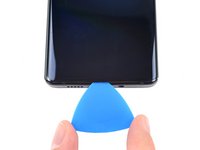
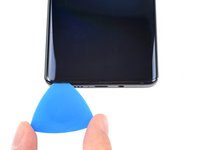
  5. Motorola Edge Fingerprint Sensor Replacement, Separate the bottom adhesive: step 5, image 1 of 3 Motorola Edge Fingerprint Sensor Replacement, Separate the bottom adhesive: step 5, image 2 of 3 Motorola Edge Fingerprint Sensor Replacement, Separate the bottom adhesive: step 5, image 3 of 3
    • Apply a suction cup to the back of the phone, as close to the center of the bottom edge as possible.

    • Pull up on the suction cup with strong, steady force to create a gap between the back cover and the frame.

    • Depending on the age of your phone, this may be difficult. If you're having trouble, apply more heat to the edge and try again.

    • Insert an opening pick into the gap.

    Ask FixBot

    Add Comment

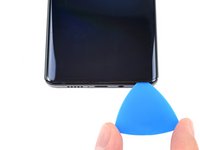
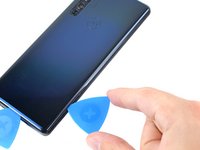
  6. Motorola Edge Fingerprint Sensor Replacement, Slice the bottom adhesive: step 6, image 1 of 3 Motorola Edge Fingerprint Sensor Replacement, Slice the bottom adhesive: step 6, image 2 of 3 Motorola Edge Fingerprint Sensor Replacement, Slice the bottom adhesive: step 6, image 3 of 3
    • Slide the pick back and forth along the bottom edge to slice through the adhesive.

    • Leave the pick in to prevent the adhesive from resealing.

    Ask FixBot
    Add Comment

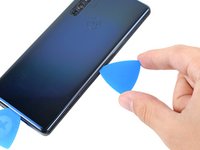
  7. Motorola Edge Fingerprint Sensor Replacement, Heat the right edge: step 7, image 1 of 1
    • Apply a heated iOpener to the back cover's right edge for two minutes.

    Ask FixBot
    Add Comment

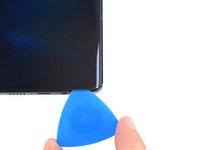
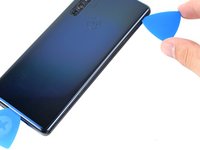
  8. Motorola Edge Fingerprint Sensor Replacement, Separate the corner adhesive: step 8, image 1 of 3 Motorola Edge Fingerprint Sensor Replacement, Separate the corner adhesive: step 8, image 2 of 3 Motorola Edge Fingerprint Sensor Replacement, Separate the corner adhesive: step 8, image 3 of 3
    • Rotate the opening pick around the bottom-right corner of the phone.

    Ask FixBot
    Add Comment

  9. Motorola Edge Fingerprint Sensor Replacement, Separate the right adhesive: step 9, image 1 of 3 Motorola Edge Fingerprint Sensor Replacement, Separate the right adhesive: step 9, image 2 of 3 Motorola Edge Fingerprint Sensor Replacement, Separate the right adhesive: step 9, image 3 of 3
    • Insert a new opening pick into the gap you just created.

    • Slide the pick along the right edge of the phone to separate the adhesive.

    • Repeat the heating, slicing, and leaving opening picks for the remaining edges of the device.

    Ask FixBot

    Add Comment

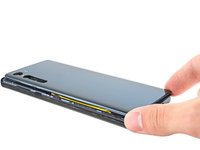
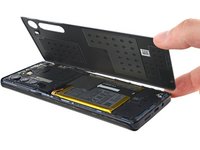
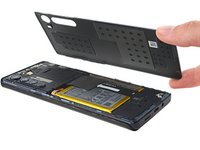
  10. Motorola Edge Fingerprint Sensor Replacement, Remove the back cover: step 10, image 1 of 3 Motorola Edge Fingerprint Sensor Replacement, Remove the back cover: step 10, image 2 of 3 Motorola Edge Fingerprint Sensor Replacement, Remove the back cover: step 10, image 3 of 3
    • Remove the back cover, taking care not to damage the components inside the phone.

    Ask FixBot

    Add Comment

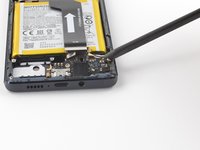
  11. Motorola Edge Fingerprint Sensor Replacement, Remove the motherboard's screws: step 11, image 1 of 1
    • Use a T5 Torx screwdriver to remove the twelve 3.4 mm-long screws securing the motherboard cover.

    Ask FixBot
    Add Comment

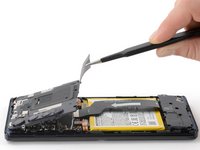
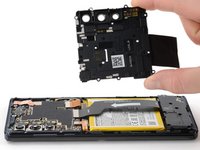
  12. Motorola Edge Fingerprint Sensor Replacement, Remove the motherboard cover: step 12, image 1 of 3 Motorola Edge Fingerprint Sensor Replacement, Remove the motherboard cover: step 12, image 2 of 3 Motorola Edge Fingerprint Sensor Replacement, Remove the motherboard cover: step 12, image 3 of 3
    Tool used on this step:
    Tweezers
    $4.99
    Buy
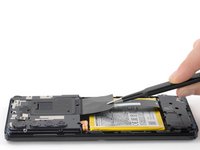
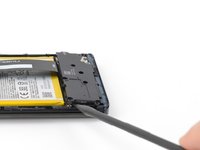
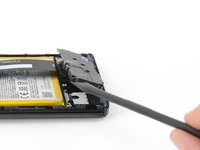
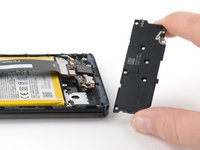
    • Use a pair of blunt tweezers or your fingers to lift up and remove the motherboard cover.

    • The motherboard cover also contains the phone's flash.

    Ask FixBot

    Add Comment

  13. Motorola Edge Fingerprint Sensor Replacement, Disconnect the battery cable's press connector: step 13, image 1 of 2 Motorola Edge Fingerprint Sensor Replacement, Disconnect the battery cable's press connector: step 13, image 2 of 2
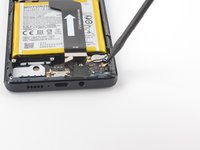
    • Use a spudger to pry up and disconnect the battery cable's press connector from the motherboard.

    • To re-attach press connectors like this one, carefully align and press down on one side until it clicks into place, then repeat on the other side. Don't press down on the middle. If the connector is misaligned, the pins can bend, causing permanent damage.

    Ask FixBot

    Add Comment

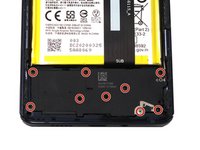
  14. Motorola Edge Fingerprint Sensor Replacement, Remove the daughterboard's t5 screws: step 14, image 1 of 2 Motorola Edge Fingerprint Sensor Replacement, Remove the daughterboard's t5 screws: step 14, image 2 of 2
    • Use a T5 Torx screwdriver to remove the nine 3.4 mm screws securing the daughterboard.

    Ask FixBot

    Add Comment

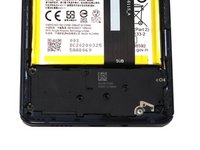
  15. Motorola Edge Fingerprint Sensor Replacement, Remove the daughterboard cover: step 15, image 1 of 3 Motorola Edge Fingerprint Sensor Replacement, Remove the daughterboard cover: step 15, image 2 of 3 Motorola Edge Fingerprint Sensor Replacement, Remove the daughterboard cover: step 15, image 3 of 3
    • Use a spudger to pry up the plastic daughterboard cover and disconnect it from the rest of the phone.

    Ask FixBot

    Add Comment

  16. Motorola Edge Fingerprint Sensor Replacement, Disconnect the interconnect cable from the daughterboard: step 16, image 1 of 2 Motorola Edge Fingerprint Sensor Replacement, Disconnect the interconnect cable from the daughterboard: step 16, image 2 of 2
    • Use a spudger to pry up and disconnect the interconnect cable's press connector from the daughterboard.

    Ask FixBot

    Add Comment

  17. Motorola Edge Fingerprint Sensor Replacement, Disconnect the fingerprint sensor cable's press connector: step 17, image 1 of 2 Motorola Edge Fingerprint Sensor Replacement, Disconnect the fingerprint sensor cable's press connector: step 17, image 2 of 2
    • Use a spudger to pry up the fingerprint sensor cable's press connector and disconnect it from the daughterboard.

    Ask FixBot

    Add Comment

  18. Motorola Edge Fingerprint Sensor Replacement, Remove the daughterboard screw: step 18, image 1 of 2 Motorola Edge Fingerprint Sensor Replacement, Remove the daughterboard screw: step 18, image 2 of 2
    • Use a T5 Torx screwdriver to remove the single 3.2 mm screw securing the daughterboard.

    Ask FixBot

    Add Comment

  19. Motorola Edge Fingerprint Sensor Replacement, Disconnect the black coaxial cable: step 19, image 1 of 2 Motorola Edge Fingerprint Sensor Replacement, Disconnect the black coaxial cable: step 19, image 2 of 2
    • Use a spudger to pry up the black coaxial cable and detach it from the daughterboard.

    Ask FixBot

    Add Comment

  20. Motorola Edge Fingerprint Sensor Replacement, Disconnect the white coaxial cable: step 20, image 1 of 2 Motorola Edge Fingerprint Sensor Replacement, Disconnect the white coaxial cable: step 20, image 2 of 2
    • Use a spudger to pry up the white coaxial cable and disconnect it from the daughterboard.

    Ask FixBot

    Add Comment

  21. Motorola Edge Fingerprint Sensor Replacement, Remove the daughterboard: step 21, image 1 of 3 Motorola Edge Fingerprint Sensor Replacement, Remove the daughterboard: step 21, image 2 of 3 Motorola Edge Fingerprint Sensor Replacement, Remove the daughterboard: step 21, image 3 of 3
    • Use a spudger to pry up and separate the daughterboard from the rest of the phone.

    • When removing and replacing the daughterboard, be careful not to damage any of the cables that attach to it.

    Ask FixBot

    Add Comment

  22. Motorola Edge Fingerprint Sensor Replacement, Disconnect the interconnect cable from the motherboard: step 22, image 1 of 2 Motorola Edge Fingerprint Sensor Replacement, Disconnect the interconnect cable from the motherboard: step 22, image 2 of 2
    • Use a spudger to pry up and disconnect the interconnect cable's press connector from the motherboard.

    Ask FixBot

    Add Comment

  23. Motorola Edge Fingerprint Sensor Replacement, Remove the interconnect cable: step 23, image 1 of 2 Motorola Edge Fingerprint Sensor Replacement, Remove the interconnect cable: step 23, image 2 of 2
    • Use your fingers to remove the interconnect cable after it has been disconnected from both the motherboard and daughterboard.

    Ask FixBot

    Add Comment

  24. Motorola Edge Fingerprint Sensor Replacement, Remove the copper tape: step 24, image 1 of 3 Motorola Edge Fingerprint Sensor Replacement, Remove the copper tape: step 24, image 2 of 3 Motorola Edge Fingerprint Sensor Replacement, Remove the copper tape: step 24, image 3 of 3
    Tool used on this step:
    Tweezers
    $4.99
    Buy
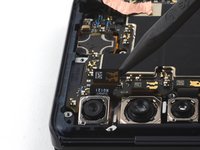
    • Use a pair of blunt tweezers to peel up and remove the copper tape covering the front camera ribbon cable.

    Ask FixBot

    Add Comment

  25. Motorola Edge Fingerprint Sensor Replacement, Remove the front camera cable's press connector: step 25, image 1 of 3 Motorola Edge Fingerprint Sensor Replacement, Remove the front camera cable's press connector: step 25, image 2 of 3 Motorola Edge Fingerprint Sensor Replacement, Remove the front camera cable's press connector: step 25, image 3 of 3
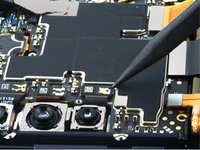
    • Use a spudger to pry up the front camera cable's press connector and disconnect it from the motherboard.

    • Remove the front camera.

    Ask FixBot

    Add Comment

  26. Motorola Edge Fingerprint Sensor Replacement, Remove the wide angle camera's press connector: step 26, image 1 of 3 Motorola Edge Fingerprint Sensor Replacement, Remove the wide angle camera's press connector: step 26, image 2 of 3 Motorola Edge Fingerprint Sensor Replacement, Remove the wide angle camera's press connector: step 26, image 3 of 3
    • Use a spudger to pry up the wide angle camera cable's press connector and disconnect it from the motherboard.

    • Remove the wide angle camera.

    Ask FixBot

    Add Comment

  27. Motorola Edge Fingerprint Sensor Replacement, Remove the main camera cable's press connector: step 27, image 1 of 3 Motorola Edge Fingerprint Sensor Replacement, Remove the main camera cable's press connector: step 27, image 2 of 3 Motorola Edge Fingerprint Sensor Replacement, Remove the main camera cable's press connector: step 27, image 3 of 3
    • Use a spudger to pry up the main camera cable's press connector and disconnect it from the motherboard.

    • Remove the main camera.

    Ask FixBot

    Add Comment

  28. Motorola Edge Fingerprint Sensor Replacement, Remove the telephoto camera's press connector: step 28, image 1 of 3 Motorola Edge Fingerprint Sensor Replacement, Remove the telephoto camera's press connector: step 28, image 2 of 3 Motorola Edge Fingerprint Sensor Replacement, Remove the telephoto camera's press connector: step 28, image 3 of 3
    • Use a spudger to pry up and disconnect the telephoto camera cable's press connector from the motherboard.

    • Remove the telephoto camera.

    Ask FixBot

    Add Comment

  29. Motorola Edge Fingerprint Sensor Replacement, Disconnect the screen ribbon cable's press connector: step 29, image 1 of 2 Motorola Edge Fingerprint Sensor Replacement, Disconnect the screen ribbon cable's press connector: step 29, image 2 of 2
    • Use a spudger to pry up and disconnect the screen ribbon cable's press connector from the motherboard.

    Ask FixBot

    Add Comment

  30. Motorola Edge Fingerprint Sensor Replacement, Disconnect the black coaxial cable: step 30, image 1 of 2 Motorola Edge Fingerprint Sensor Replacement, Disconnect the black coaxial cable: step 30, image 2 of 2
    • Use a spudger to pry up the black coaxial cable and detach it from the motherboard.

    Ask FixBot

    Add Comment

  31. Motorola Edge Fingerprint Sensor Replacement, Disconnect the white coaxial cable: step 31, image 1 of 2 Motorola Edge Fingerprint Sensor Replacement, Disconnect the white coaxial cable: step 31, image 2 of 2
    • Use a spudger to pry up the white coaxial cable and detach it from the motherboard.

    Ask FixBot

    Add Comment

  32. Motorola Edge Fingerprint Sensor Replacement, Remove the motherboard: step 32, image 1 of 3 Motorola Edge Fingerprint Sensor Replacement, Remove the motherboard: step 32, image 2 of 3 Motorola Edge Fingerprint Sensor Replacement, Remove the motherboard: step 32, image 3 of 3
    • Use a spudger to pry up and remove the motherboard.

    • Make sure no cables get trapped under the motherboard during reassembly.

    Ask FixBot

    Add Comment

  33. Motorola Edge Fingerprint Sensor Replacement, Weaken the battery's adhesive: step 33, image 1 of 1
    • Heat an iOpener and place it on the screen for two minutes in order to loosen the adhesive on the battery.

    • You may need to reheat and reapply the iOpener several times to get the phone warm enough. Follow the iOpener instructions to avoid overheating.

    Ask FixBot

    Add Comment

  34. Motorola Edge Fingerprint Sensor Replacement, Create a gap between the battery and the frame: step 34, image 1 of 2 Motorola Edge Fingerprint Sensor Replacement, Create a gap between the battery and the frame: step 34, image 2 of 2
    • Wedge the pointed end of an opening pick between the right side of the battery and the midframe.

    • Take care not to puncture or bend the battery with your tool—a punctured or bent battery may leak dangerous chemicals or cause a fire.

    • Be careful not to damage the screen's ribbon cable, which is located underneath the battery.

    Ask FixBot

    Add Comment

  35. Motorola Edge Fingerprint Sensor Replacement, Switch to a plastic card: step 35, image 1 of 3 Motorola Edge Fingerprint Sensor Replacement, Switch to a plastic card: step 35, image 2 of 3 Motorola Edge Fingerprint Sensor Replacement, Switch to a plastic card: step 35, image 3 of 3
    Tool used on this step:
    Plastic Cards
    $2.99
    Buy
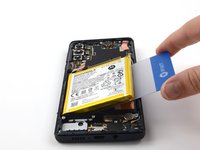
    • After making a gap between the battery and the frame, replace the opening pick with a plastic card.

    • A plastic card will help ensure that the battery is not bent or damaged while being removed.

    Ask FixBot

    Add Comment

  36. Motorola Edge Fingerprint Sensor Replacement, Cut through the battery's adhesive: step 36, image 1 of 3 Motorola Edge Fingerprint Sensor Replacement, Cut through the battery's adhesive: step 36, image 2 of 3 Motorola Edge Fingerprint Sensor Replacement, Cut through the battery's adhesive: step 36, image 3 of 3
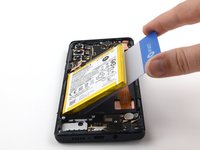
    • Carefully slide a plastic card underneath the battery to cut through the adhesive.

    Ask FixBot

    Add Comment

  37. Motorola Edge Fingerprint Sensor Replacement, Remove the battery: step 37, image 1 of 3 Motorola Edge Fingerprint Sensor Replacement, Remove the battery: step 37, image 2 of 3 Motorola Edge Fingerprint Sensor Replacement, Remove the battery: step 37, image 3 of 3
    • Slide a plastic card under the battery, then carefully lift the battery up until the adhesive is loose enough to remove the battery.

    Ask FixBot

    Add Comment

  38. Motorola Edge Fingerprint Sensor Replacement: step 38, image 1 of 3 Motorola Edge Fingerprint Sensor Replacement: step 38, image 2 of 3 Motorola Edge Fingerprint Sensor Replacement: step 38, image 3 of 3
    • Separate and remove the battery from the midframe.

    • If the battery is deformed, dented, or damaged in any way, don't reinstall it. Reinstalling a damaged battery is a potential safety hazard. Replace it with a new one.

    • During reassembly, follow this guide if you are using a pre-cut adhesive card to reinstall the battery.

    Ask FixBot

    Add Comment

  39. Motorola Edge Fingerprint Sensor Replacement, Remove the midframe: step 39, image 1 of 3 Motorola Edge Fingerprint Sensor Replacement, Remove the midframe: step 39, image 2 of 3 Motorola Edge Fingerprint Sensor Replacement, Remove the midframe: step 39, image 3 of 3
    • Turn the phone over and remove the midframe while gently threading the screen ribbon cable through the opening in the midframe.

    Ask FixBot

    Add Comment

  40. Motorola Edge Fingerprint Sensor Replacement, Weaken the fingerprint sensor's adhesive: step 40, image 1 of 1
    • Use a drop or two of isopropyl alcohol to weaken the fingerprint sensor's adhesive.

    • Wait thirty seconds for the isopropyl alcohol to weaken the adhesive.

    Ask FixBot

    Add Comment

  41. Motorola Edge Fingerprint Sensor Replacement, Disconnect the fingerprint sensor cable: step 41, image 1 of 3 Motorola Edge Fingerprint Sensor Replacement, Disconnect the fingerprint sensor cable: step 41, image 2 of 3 Motorola Edge Fingerprint Sensor Replacement, Disconnect the fingerprint sensor cable: step 41, image 3 of 3
    • Use an opening pick to carefully separate the fingerprint sensor cable from the midframe.

    Ask FixBot

    Add Comment

  42. Motorola Edge Fingerprint Sensor Replacement, Thread the fingerprint sensor cable: step 42, image 1 of 3 Motorola Edge Fingerprint Sensor Replacement, Thread the fingerprint sensor cable: step 42, image 2 of 3 Motorola Edge Fingerprint Sensor Replacement, Thread the fingerprint sensor cable: step 42, image 3 of 3
    • Turn the phone over, then carefully thread the the fingerprint sensor cable through the opening in the midframe.

    Ask FixBot

    Add Comment

  43. Motorola Edge Fingerprint Sensor Replacement: step 43, image 1 of 3 Motorola Edge Fingerprint Sensor Replacement: step 43, image 2 of 3 Motorola Edge Fingerprint Sensor Replacement: step 43, image 3 of 3
    • Carefully finish separating the fingerprint sensor from the midframe.

    • Remove the fingerprint sensor.

    Ask FixBot

    Add Comment

Conclusion

To reassemble your device, follow these instructions in reverse order.

For optimal performance, calibrate your newly installed battery after completing this guide.

Take your e-waste to an R2 or e-Stewards certified recycler.

Repair didn’t go as planned? Try some basic troubleshooting, or ask our Answers Community for help.

Compare your new replacement part to the original part—you may need to transfer remaining components or remove adhesive backings from the new part before you install it.

Cancel: I did not complete this guide.

Jennifer Berg

Member since: 03/21/22

2,869 Reputation

24 Guides authored

0 Guide Comments

Add Comment

View Statistics:

Past 24 Hours: 1

Past 7 Days: 15

Past 30 Days: 62

All Time: 3,402