Introduction
When the E815 becomes unresponsive, removing and replacing the battery is often the first and best solution.
To replace the battery, you are going to:
- Remove back cover
- Remove Battery
- Replace Battery
-
-
-
Locate the back cover release slide.
-
Use your finger to slide it down.
 Ask FixBot
-
-
-
-
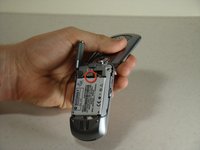
Locate the battery removal slot.
-
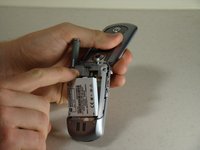
Use your finger to pull the battery out from the top.
-
Remove the battery.
-
-


To reassemble your device, follow these instructions in reverse order.
Cancel: I did not complete this guide.
2 other people completed this guide.

Team

Cal Poly, Team 14-8, Forte Winter 2011 Member of Cal Poly, Team 14-8, Forte Winter 2011
CPSU-FORTE-W11S14G8
5 Members
60 Guides authored
