Free Shipping on Domestic Orders $75+

Motorola Droid X2 Motherboard Replacement

What you need

  1. Motorola Droid X2 Motherboard Replacement, Battery: step 1, image 1 of 3 Motorola Droid X2 Motherboard Replacement, Battery: step 1, image 2 of 3 Motorola Droid X2 Motherboard Replacement, Battery: step 1, image 3 of 3
    • Slide the plastic case off of the back of the phone, exposing the battery.

    Ask FixBot

    Add Comment

  2. Motorola Droid X2 Motherboard Replacement: step 2, image 1 of 3 Motorola Droid X2 Motherboard Replacement: step 2, image 2 of 3 Motorola Droid X2 Motherboard Replacement: step 2, image 3 of 3
    • Pull up on the red battery release tab and pull the battery out of the phone.

    Ask FixBot

    Add Comment

  3. Motorola Droid X2 Motherboard Replacement, Motherboard: step 3, image 1 of 2 Motorola Droid X2 Motherboard Replacement, Motherboard: step 3, image 2 of 2
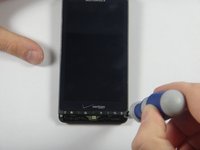
    • Remove the circled screws using a T-5 torques. These screws will be 4.3 millimeters in length.

    • Be careful to not strip any screws.

    Ask FixBot

    Add Comment

  4. Motorola Droid X2 Motherboard Replacement: step 4, image 1 of 3 Motorola Droid X2 Motherboard Replacement: step 4, image 2 of 3 Motorola Droid X2 Motherboard Replacement: step 4, image 3 of 3
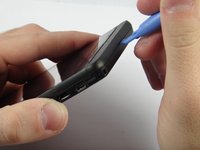
    • Using a prying tool, snap off the front casing on the top and bottom of the phone.

    • Be careful not to lose the small rubber piece that sits over the microphone.

    Ask FixBot

    Add Comment

  5. Motorola Droid X2 Motherboard Replacement: step 5, image 1 of 2 Motorola Droid X2 Motherboard Replacement: step 5, image 2 of 2
    • Remove the circled screws using a T-5 torques.. These screws should be 5.8 millimeters in length.

    Ask FixBot

    Add Comment

  6. Motorola Droid X2 Motherboard Replacement: step 6, image 1 of 3 Motorola Droid X2 Motherboard Replacement: step 6, image 2 of 3 Motorola Droid X2 Motherboard Replacement: step 6, image 3 of 3
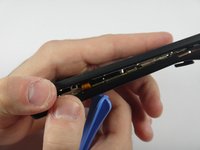
    • Using a plastic opening tool, snap open the phone. It should separate into a front piece with the hardware and a plastic backing.

    Ask FixBot

    Add Comment

  7. Motorola Droid X2 Motherboard Replacement: step 7, image 1 of 3 Motorola Droid X2 Motherboard Replacement: step 7, image 2 of 3 Motorola Droid X2 Motherboard Replacement: step 7, image 3 of 3
    Tool used on this step:
    Tweezers
    $4.99
    Buy
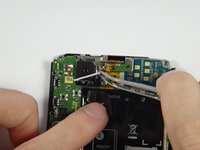
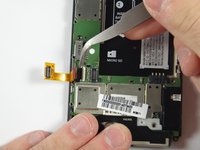
    • Using tweezers, remove the white wire at the top of the phone near the camera.

    Ask FixBot

    Add Comment

  8. Motorola Droid X2 Motherboard Replacement: step 8, image 1 of 2 Motorola Droid X2 Motherboard Replacement: step 8, image 2 of 2
    • Remove these nine screws using a T-3 torques. These screws should be 2.40 mm in length

    Ask FixBot

    Add Comment

  9. Motorola Droid X2 Motherboard Replacement: step 9, image 1 of 2 Motorola Droid X2 Motherboard Replacement: step 9, image 2 of 2
    • Using tweezers, removed the white electrical tape on the motherboard.

    Ask FixBot

    Add Comment

  10. Motorola Droid X2 Motherboard Replacement: step 10, image 1 of 2 Motorola Droid X2 Motherboard Replacement: step 10, image 2 of 2
    • Using the plastic opening tool, lift up to remove the connector.

    Ask FixBot

    Add Comment

  11. Motorola Droid X2 Motherboard Replacement: step 11, image 1 of 2 Motorola Droid X2 Motherboard Replacement: step 11, image 2 of 2
    • Using a pry tool, lift the jawbone connector.

    Ask FixBot

    Add Comment

  12. Motorola Droid X2 Motherboard Replacement: step 12, image 1 of 2 Motorola Droid X2 Motherboard Replacement: step 12, image 2 of 2
    • Using tweezers, carefully disconnect the cable connector by pulling the cable out.

    Ask FixBot

    Add Comment

  13. Motorola Droid X2 Motherboard Replacement: step 13, image 1 of 3 Motorola Droid X2 Motherboard Replacement: step 13, image 2 of 3 Motorola Droid X2 Motherboard Replacement: step 13, image 3 of 3
    • Use a spudger to disconnect the cable connector.

    Ask FixBot

    Add Comment

  14. Motorola Droid X2 Motherboard Replacement: step 14, image 1 of 3 Motorola Droid X2 Motherboard Replacement: step 14, image 2 of 3 Motorola Droid X2 Motherboard Replacement: step 14, image 3 of 3
    • Using a spudger, remove the camera. Lift up the motherboard and slide the spudger under the camera.

    Ask FixBot

    Add Comment

Conclusion

To reassemble your device, follow these instructions in reverse order.

Cancel: I did not complete this guide.

One other person completed this guide.

Aaron Mak

Member since: 10/29/14

658 Reputation

4 Guides authored

Team

UMass Dartmouth, Team 4-3, Miles Fall 2014 Member of UMass Dartmouth, Team 4-3, Miles Fall 2014

UMASSD-MILES-F14S4G3

3 Members

8 Guides authored

0 Guide Comments

Add Comment

View Statistics:

Past 24 Hours: 1

Past 7 Days: 13

Past 30 Days: 36

All Time: 1,210