Free Shipping on Domestic Orders $75+

Motorola Droid Pro SD Card/SIM Card PCB Board Replacement

What you need

    1. Motorola Droid Pro SD Card/SIM Card PCB Board Replacement, Battery: step 1, image 1 of 1
      • Remove the back cover using the thumb tab located on the bottom of the phone.

      Ask FixBot

      Add Comment

    2. Motorola Droid Pro SD Card/SIM Card PCB Board Replacement: step 2, image 1 of 2 Motorola Droid Pro SD Card/SIM Card PCB Board Replacement: step 2, image 2 of 2
      • Remove the battery using the thumb tab.

      Ask FixBot

      Add Comment

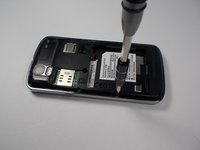
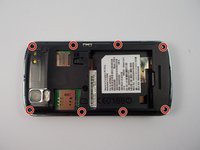
    1. Motorola Droid Pro SD Card/SIM Card PCB Board Replacement, SD Card/SIM Card PCB Board: step 3, image 1 of 2 Motorola Droid Pro SD Card/SIM Card PCB Board Replacement, SD Card/SIM Card PCB Board: step 3, image 2 of 2
      • Using a T4 Torx driver, remove the eight 4 mm back panel screws.

      Ask FixBot

      Add Comment

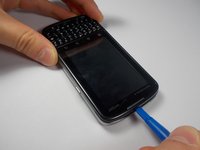
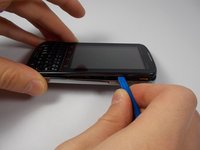
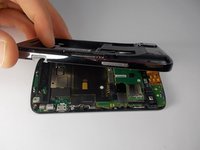
    2. Motorola Droid Pro SD Card/SIM Card PCB Board Replacement: step 4, image 1 of 3 Motorola Droid Pro SD Card/SIM Card PCB Board Replacement: step 4, image 2 of 3 Motorola Droid Pro SD Card/SIM Card PCB Board Replacement: step 4, image 3 of 3
      • Use a plastic opening tool to open the phone along the sides between the front panel and the chrome trim.

      • It is held together by small clips that lock in. You may have to use extra force to unlock them.

      • Go around on all sides of the phone, unlocking the clips. Then pull the back panel off.

      Ask FixBot

      Add Comment

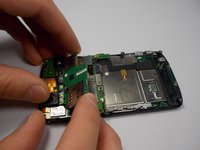
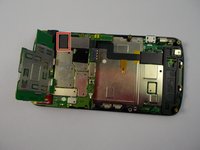
    3. Motorola Droid Pro SD Card/SIM Card PCB Board Replacement: step 5, image 1 of 2 Motorola Droid Pro SD Card/SIM Card PCB Board Replacement: step 5, image 2 of 2
      • Gently lift the SD & SIM card board (PCB) as shown.

      • There is a ribbon cable attached underneath. Gently pull the PCB board away from the phone and it will detach easily.

      Ask FixBot

      Add Comment

Conclusion

To reassemble your device, follow these instructions in reverse order.

Cancel: I did not complete this guide.

2 other people completed this guide.

Kyle Shays

Member since: 10/28/15

836 Reputation

4 Guides authored

Team

UMass Dartmouth, Team 1-6, Miles Fall 2015 Member of UMass Dartmouth, Team 1-6, Miles Fall 2015

UMASSD-MILES-F15S1G6

3 Members

72 Guides authored

1 Guide Comment

Does the replacement board have to be from the same phone or does any sim board work from any phone as long as it's 3g

lisa marie - Reply Share

Add Comment

View Statistics:

Past 24 Hours: 0

Past 7 Days: 3

Past 30 Days: 19

All Time: 652