
Motorola C290 Screen Replacement

Angelo Ballungay and 12 other contributors
Last updated on Jan 3, 2024
Views: 2.3K
View statistics:
- Past 24 Hours:
- 3
- Past 7 Days:
- 17
- Past 30 Days:
- 93
- All Time:
- 2,254
Comments: 0
No one has left comments on this guide. Will you be first?
Go to guide commentsCompleted: 0 1
No one has marked this guide "completed." Will you be the first?
1 person has marked this guide "completed." It's you — great job!
Favorites: 1 2
1 person has favorited (and subscribed to) this guide. Will you be next?
2 people have favorited (and subscribed to) this guide — including you!
Missing Steps
Oops! This guide is currently missing one or more important steps.
Slice and Dice
The steps in this guide should be split up and made into a series of prerequisite guides.
Introduction
Go to step 1 ↓This repair guide describes how to remove the screen of the Motorola C290.
What you need
Tools
-
-
Spudger4.9
-


-
-
-
Flip open your Motorola C290.
-
Remove rubber stoppers located around main screen using a push pin.
-
Use a Torx T6 Screwdriver to unscrew the four screws.
 Ask FixBot
-
-
-
Use a plastic opening tool to pry open a gap between the top cover and the face of the phone.
-
Slide the plastic opening tool along gap and pry open case.
-
Remove top cover.
-
-
-
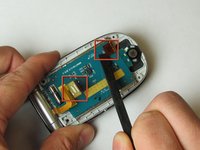
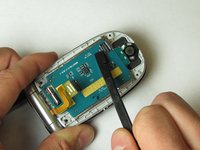
Unclip circuit attachments located on back of screen circuit board using a Spudger.
-
-
-
-
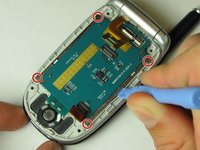
Insert the plastic opening tool between the metal screen components and the plastic frame at the corners.
-
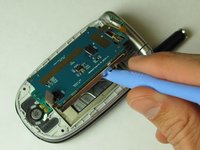
Firmly pry the screen components from the frame with a twisting motion
-
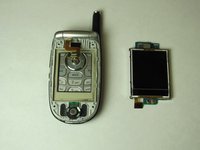
Completely remove screen components from frame.
-
-




To reassemble your device, follow these instructions in reverse order.

Team

Cal Poly, Team 24-28, Regan Spring 2010 Member of Cal Poly, Team 24-28, Regan Spring 2010
CPSU-REGAN-S10S24G28
4 Members
72 Guides authored
