Introduction
To remove the speaker you will need to remove the battery, open the phone and remove the motherboard. Be ready to use a plastic opening tool, T5 Torx Screwdriver and a spudger.
What you need
-
-
Tool used on this step:Spudger$3.99
-
Insert a spudger into the small notch at the base of the battery.
-
Lift the battery out of the phone.
-
-
-
Tool used on this step:T5 Torx Screwdriver$5.49
-
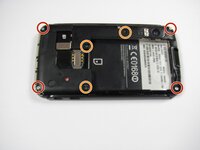
Remove the four 5.0 mm T5 Torx screws using a T5 Torx Screwdriver.
-
Remove the three 5.5 mm T5 Torx screws using a T5 Torx Screwdriver.
-
-
Tool used on this step:iFixit Opening Tool$1.99
-
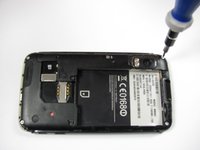
Lift up the black rubber flap using an opening tool.
-
Remove the single 5.5 mm T5 Torx screw using a T5 Torx Screwdriver.
-
-
Tool used on this step:iFixit Opening Tool$1.99
-
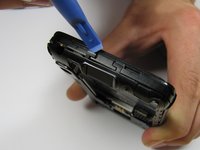
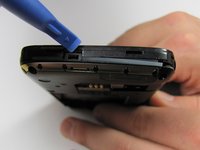
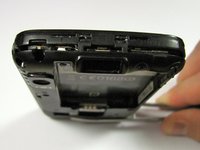
Gently lift the tabs located at the top of the phone using an opening tool.
-
Gently lift the tab located at the bottom of the phone with the same tool.
-
-
-
Tool used on this step:iFixit Opening Tool$1.99
-
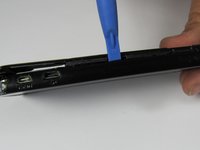
Insert an opening tool between the front and back of the case.
-
Slide the tool down the side of the phone.
-
Repeat the same process for the other side.
-
-
Tool used on this step:iFixit Opening Tool$1.99
-
Slide an opening tool beneath the antenna and lift straight up from the motherboard.
-
-
-
Ease the antenna from out of its guide along the side of the phone
-
Remove the back case and the antenna from the phone.
-
-
-
-
Tool used on this step:Spudger$3.99
-
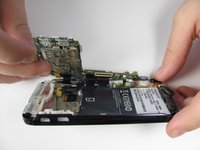
Insert a spudger between the black plastic and the motherboard.
-
Lift upwards with the spudger to dislodge the board.
-
-
Tool used on this step:Spudger$3.99
-
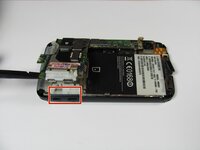
Disconnect the press connectors using a spudger.
-
-
Tool used on this step:Spudger$3.99
-
Lift the white latch on the ZIF connector using a spudger.
-
Gently pull the black ribbon down and away from the latch.
-
-
-
There should be five distinct parts of the phone: the back cover, the back case, the front case, the battery, and the motherboard.
-
-
-
-
-
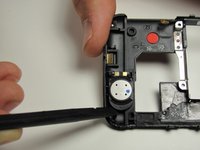
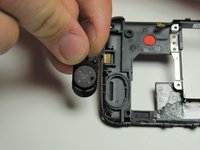
The speaker can be found on the bottom of the inside of the back case and is held in by glue.
-
Use a spudger or case opener tool to pry out the speaker by sliding it in the crack between the two pieces of black plastic.
-
-

 Ask FixBot










To reassemble your device, follow these instructions in reverse order.
Cancel: I did not complete this guide.
2 other people completed this guide.

Team

Cal Poly, Team 9-42, Regan Spring 2012 Member of Cal Poly, Team 9-42, Regan Spring 2012
CPSU-REGAN-S12S9G42
6 Members
84 Guides authored
