Free Shipping on Domestic Orders $75+

Motorola Atrix 4G Antenna Replacement

What you need

  1. Motorola Atrix 4G Antenna Replacement, Battery: step 1, image 1 of 1
    • Pry the back cover off the back of the phone.

    Ask FixBot

    Add Comment

  2. Motorola Atrix 4G Antenna Replacement: step 2, image 1 of 2 Motorola Atrix 4G Antenna Replacement: step 2, image 2 of 2
    Tool used on this step:
    Spudger
    $3.99
    Buy
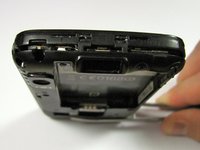
    • Insert a spudger into the small notch at the base of the battery.

    • Lift the battery out of the phone.

    Ask FixBot

    Add Comment

  3. Motorola Atrix 4G Antenna Replacement, Antenna: step 3, image 1 of 2 Motorola Atrix 4G Antenna Replacement, Antenna: step 3, image 2 of 2
    Tool used on this step:
    T5 Torx Screwdriver
    $5.49
    Buy
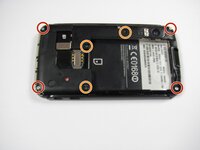
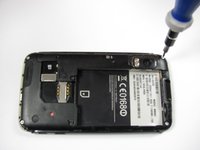
    • Remove the four 5.0 mm T5 Torx screws using a T5 Torx Screwdriver.

    • Remove the three 5.5 mm T5 Torx screws using a T5 Torx Screwdriver.

    • Use gentle force while unscrewing to avoid stripping the screws.

    Ask FixBot

    Add Comment

  4. Motorola Atrix 4G Antenna Replacement: step 4, image 1 of 1
    Tool used on this step:
    iFixit Opening Tool
    $1.99
    Buy
    Ask FixBot

    Add Comment

  5. Motorola Atrix 4G Antenna Replacement: step 5, image 1 of 2 Motorola Atrix 4G Antenna Replacement: step 5, image 2 of 2
    Tool used on this step:
    iFixit Opening Tool
    $1.99
    Buy
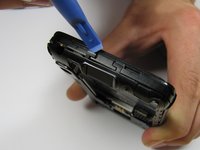
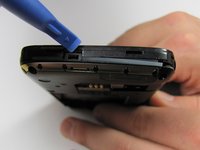
    • Gently lift the tabs located at the top of the phone using an opening tool.

    • Gently lift the tab located at the bottom of the phone with the same tool.

    • Use an opening tool, not your fingers, because the plastic tabs are easily broken.

    Ask FixBot

    Add Comment

  6. Motorola Atrix 4G Antenna Replacement: step 6, image 1 of 2 Motorola Atrix 4G Antenna Replacement: step 6, image 2 of 2
    Tool used on this step:
    iFixit Opening Tool
    $1.99
    Buy
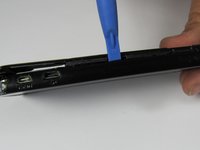
    • Insert an opening tool between the front and back of the case.

    • Slide the tool down the side of the phone.

    • Repeat the same process for the other side.

    • There should be a noticeable gap between the front and back cases. If not, repeat this step.

    Ask FixBot

    Add Comment

  7. Motorola Atrix 4G Antenna Replacement: step 7, image 1 of 1
    • Carefully lift the back case off the phone.

    • Do not completely separate the back case from the phone. The antenna is connected to both cases.

    Ask FixBot

    Add Comment

  8. Motorola Atrix 4G Antenna Replacement: step 8, image 1 of 1
    Tool used on this step:
    iFixit Opening Tool
    $1.99
    Buy
    • Slide an opening tool beneath the antenna and lift straight up from the motherboard.

    • Lift straight upwards, not at an angle, to avoid damaging the socket underneath.

    Ask FixBot

    Add Comment

  9. Motorola Atrix 4G Antenna Replacement: step 9, image 1 of 1
    • Ease the antenna from out of its guide along the side of the phone

    • Remove the back case and the antenna from the phone.

    • The antenna is soldered to the back case. When reassembling, do not pull it with too much force.

    Ask FixBot

    Add Comment

Conclusion

To reassemble your device, follow these instructions in reverse order.

Cancel: I did not complete this guide.

5 other people completed this guide.

Derek Walker

Member since: 04/19/12

297 Reputation

4 Guides authored

Team

Cal Poly, Team 9-42, Regan Spring 2012 Member of Cal Poly, Team 9-42, Regan Spring 2012

CPSU-REGAN-S12S9G42

6 Members

15 Guides authored

0 Guide Comments

Add Comment

View Statistics:

Past 24 Hours: 1

Past 7 Days: 15

Past 30 Days: 51

All Time: 5,969