This translation was generated by a machine and has not been reviewed by a person yet. Speak this language? Review it.

Miele S5311 Vacuum Cleaner Disassembly Guide

Jürgen Hummer and 2 other contributors
Last updated on Sep 2, 2026
Views: 1.9K
View statistics:
- Past 24 Hours:
- 13
- Past 7 Days:
- 69
- Past 30 Days:
- 279
- All Time:
- 1,912
Comments: 0
No one has left comments on this guide. Will you be first?
Go to guide commentsCompleted: 0 1
No one has marked this guide "completed." Will you be the first?
1 person has marked this guide "completed." It's you — great job!
Favorites: 0 1
No one has favorited (and subscribed to) this guide. Will you be the first?
1 person has favorited (and subscribed to) this guide — and that's you!
Featured Guide
This guide has been found to be exceptionally cool by the iFixit staff.
Community-Contributed Guide
An awesome member of our community made this guide. It was not created by iFixit staff.
Introduction
Go to step 1 ↓How do you disassemble a Miele S5 series vacuum cleaner, in my case an S5311?
What you need
-
-
-
Open the cover, remove the dust bag and dust filter (already done here), and release the deep-seated screws (TX15).
-
Also release the two screws next to the grille.
 Ask FixBot
-
-
-
Carefully but firmly pry the two suction power buttons upward using a flat-head screwdriver.
-
Remove the two screws that are now exposed.
-
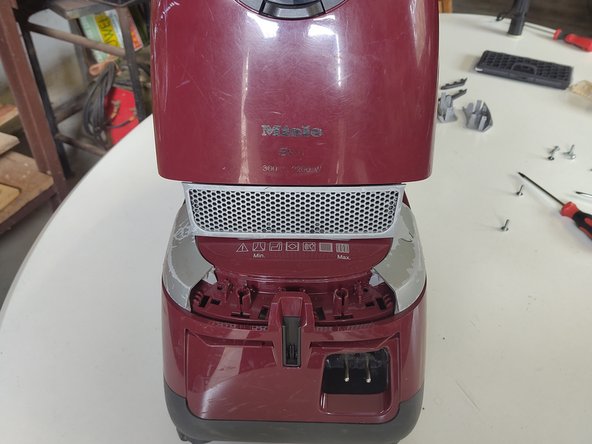
The entire top section, shown here in red, can be unplugged by pulling it upward.
-
-
-
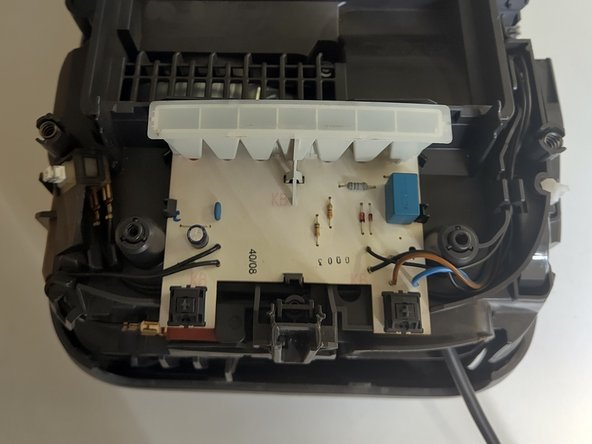
Below this, the PCB with switches and LEDs becomes visible.
-
It can be pulled straight up - carefully remove it from the connector.
-
-
-
-
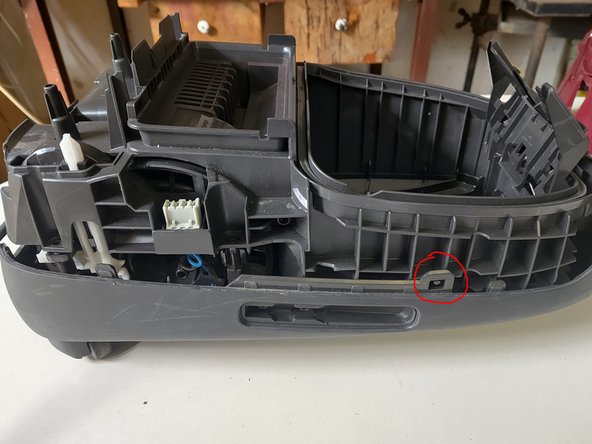
Release the three additional screws—one in the center, two at the corners.
-
-
-
Unclip the middle top cover on the left and right, then pull it off upwards.
-
-
-
The motor and the cable rewind are now exposed.
-
Disconnect the motor and lift it out.
-
The cable rewind can also be lifted out and, if necessary, disassembled further using a smaller Torx screwdriver.
-
-








Follow the steps in reverse order to reassemble your device.

