
Microsoft Zune HD Controls Sidebar Replacement

Walter Galan and 4 other contributors
Last updated on Jul 31, 2013
Views: 3.7K
View statistics:
- Past 24 Hours:
- 1
- Past 7 Days:
- 17
- Past 30 Days:
- 95
- All Time:
- 3,688
Comments: 1
1 guide comment.
Go to guide commentsCompleted: 1 2
1 person has marked this guide "completed." Will you be next?
2 people have marked this guide "completed." Including you — great job!
Favorites: 2 3
2 people have favorited (and subscribed to) this guide. Will you be next?
3 people have favorited (and subscribed to) this guide — including you!
Introduction
Go to step 1 ↓Unable to raise or lower the volume? Replace the controls sidebar and restore balance to the force.
What you need
Tools


-
-
-
Remove the four Tri-Wing screws securing the upper rear panel to the inner chassis.
 Ask FixBot
-
-
-
Slightly rotate the top edge of the upper rear panel away from the Zune.
-
Lift the upper rear panel straight up off the black plastic lower rear panel.
-
-
-
-
-
-
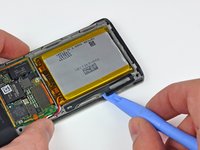
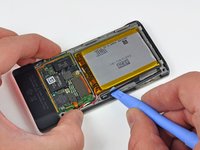
Use a Zune opening tool to gently lift the media button lever off the post cast into the inner chassis.
-
-


To reassemble your device, follow these instructions in reverse order.
Cancel: I did not complete this guide.
One other person completed this guide.

