Free Shipping on Domestic Orders $75+

Microsoft Zune 80 Case Replacement

What you need

  1. Microsoft Zune 80 Case Replacement, Case: step 1, image 1 of 1
    • Use a metal spudger or Zune opening tool to remove the small silver plastic cap on top of the device.

    Ask FixBot

    Add Comment

  2. Microsoft Zune 80 Case Replacement: step 2, image 1 of 1
    • There are two T3 screws under the cap. Remove both with a T3 screwdriver.

    • Be careful with removing these screws! These screwheads are prone to breaking.

    Ask FixBot

    Add Comment

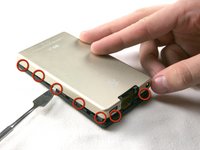
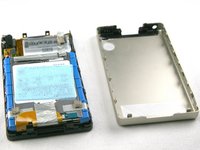
  3. Microsoft Zune 80 Case Replacement, Remove the Casing: step 3, image 1 of 2 Microsoft Zune 80 Case Replacement, Remove the Casing: step 3, image 2 of 2
    • Using a metal spudger or Zune opening tool, remove the aluminum backing starting from the top. There are 5 clips on each side and two on the bottom.

    • Be careful not to press the tools in too far; there are exposed cables right inside the edge of the device.

    Ask FixBot

    Add Comment

Conclusion

To reassemble your device, follow these instructions in reverse order.

Cancel: I did not complete this guide.

One other person completed this guide.

turey

Member since: 11/11/09

417 Reputation

2 Guides authored

Team

Cal Poly, Team 6-5, Maness Fall 2009 Member of Cal Poly, Team 6-5, Maness Fall 2009

CPSU-MANESS-F09S6G5

5 Members

8 Guides authored

1 Guide Comment

I have followed these steps but im unable to get the back case off, any tips for a stubborn backing?

zippy9765 - Reply Share

Add Comment

View Statistics:

Past 24 Hours: 0

Past 7 Days: 12

Past 30 Days: 56

All Time: 5,636