Free Shipping on Domestic Orders $75+

Microsoft Surface Pro 7 Kickstand Replacement

What you need

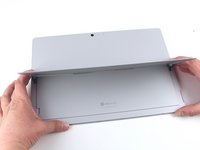
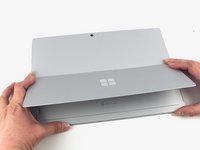
  1. Microsoft Surface Pro 7 Kickstand Replacement, Open the kickstand: step 1, image 1 of 3 Microsoft Surface Pro 7 Kickstand Replacement, Open the kickstand: step 1, image 2 of 3 Microsoft Surface Pro 7 Kickstand Replacement, Open the kickstand: step 1, image 3 of 3
    • Lift the kickstand to expose the hinge screws.

    Ask FixBot

    Add Comment

  2. Microsoft Surface Pro 7 Kickstand Replacement, Remove the kickstand screws: step 2, image 1 of 2 Microsoft Surface Pro 7 Kickstand Replacement, Remove the kickstand screws: step 2, image 2 of 2
    • Remove the four 2.7 mm T3 screws—two on each side of the kickstand.

    Ask FixBot

    Add Comment

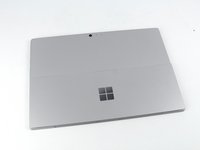
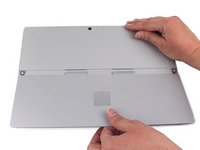
  3. Microsoft Surface Pro 7 Kickstand Replacement, Close the kickstand: step 3, image 1 of 3 Microsoft Surface Pro 7 Kickstand Replacement, Close the kickstand: step 3, image 2 of 3 Microsoft Surface Pro 7 Kickstand Replacement, Close the kickstand: step 3, image 3 of 3
    • Move the kickstand back down to a flat position.

    • The hinges are stiff and you may need to use some force to get it down.

    Ask FixBot

    Add Comment

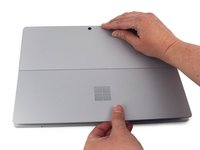
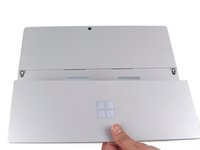
  4. Microsoft Surface Pro 7 Kickstand Replacement, Remove the kickstand: step 4, image 1 of 3 Microsoft Surface Pro 7 Kickstand Replacement, Remove the kickstand: step 4, image 2 of 3 Microsoft Surface Pro 7 Kickstand Replacement, Remove the kickstand: step 4, image 3 of 3
    • Remove the kickstand from the back cover.

    • There are two adhesive tabs in the middle of the kickstand that disengage most easily when the kickstand is pulled directly downward from the device.

    • Be sure to insert these tabs when reinstalling the new kickstand before replacing the screws.

    Ask FixBot

    Add Comment

Conclusion

To reassemble your device, follow the above steps in reverse order.

Take your e-waste to an R2 or e-Stewards certified recycler.

Repair didn’t go as planned? Try some basic troubleshooting, or ask our Answers community for help.

Cancel: I did not complete this guide.

One other person completed this guide.

Sam Omiotek

Member since: 02/25/19

99,095 Reputation

290 Guides authored

2 Guide Comments

One of the hinges broke on my Surface Pro 6.

1. I removed the broken hinge, closed the kickstand and duct taped the seam.

2. I opened the kickstand wide and duct taped the seam.

The single hinge and duct tape seem to be working!

"Spare the duct tape, spoil the job." - Red Green

P Best - Reply Share

What are the parts used for this fix?

Andrea Shaw - Reply Share

Add Comment

View Statistics:

Past 24 Hours: 2

Past 7 Days: 27

Past 30 Days: 91

All Time: 10,126