
Microsoft Surface Pro 3 SSD Replacement Dodgy Style

Hamish Davis and 6 other contributors
Last updated on Jun 26, 2024
Views: 8.3K
View statistics:
- Past 24 Hours:
- 4
- Past 7 Days:
- 43
- Past 30 Days:
- 192
- All Time:
- 8,326
Comments: 3
1 comment on steps, 2 guide comments.
Go to guide commentsCompleted: 4 5
4 people have marked this guide "completed." Will you be next?
5 people have marked this guide "completed." Including you — great job!
Favorites: 4 5
4 people have favorited (and subscribed to) this guide. Will you be next?
5 people have favorited (and subscribed to) this guide — including you!
Scenic Route
This guide's procedure isn't the most efficient way to get the job done, but still may be useful in some circumstances.
Confusing Text
Some of this guide's text is confusing, duplicated, or off-topic. Clarify it by editing!
Markup Mishap
This guide needs better markups. Help out by correcting or making some markup annotations.
Community-Contributed Guide
An awesome member of our community made this guide. It was not created by iFixit staff.
Introduction
Go to step 1 ↓This guide shows a second way to open a Surface Pro 3 and replace the drive without paying the money Microsoft wants and without risking destroying the display. This is not the original guide, but it's slightly better and safer than this guide.
What you need
-
-
-
Print this off to scale it up to the right size of the surface and mark it up with a pencil.
-
When it is marked up it should look something like the second photo.
 Ask FixBot
-
-
-
You want to use a V bit on a CNC machine to cut it nicer and give it a chambered edge.
-
It's also a good idea to put some paper towel in between the clamps and the Surface. Also be sure to have the type cover on so you don't damage the screen.
-
-
-
The drive should just lift out, I used a Micro SD card to cover my serial number.
-
-
-
-
Now this is where it gets interesting. you can either try to make the recovery USB from This or you can book an appointment with someone at the Microsoft store and they can make it work and install all new drivers. The only thing they won't do now once you cut it open is replace it
-
Either that or you can install linux on it from www.reddit.com/r/surfacelinux
-
-


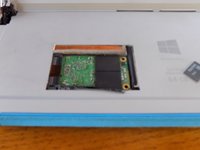
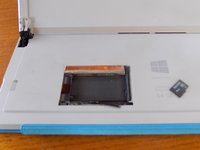

There is no going back but with some files and a drill bit you can make a sweet keychain fob that you can engrave with the CNC machine
Cancel: I did not complete this guide.
4 other people completed this guide.

2 Guide Comments
While this will make a tidy hole, the fact that you can't guarantee shavings won't fall into the chassis makes this riskier than a busted screen. Replacing the motherboard or battery are expensive by themselves, but a shaving that gets lodged into the battery is a fire risk, and lipo batteries aren't known for calm fires
I love this, I think this may be a viable method for replacing batteries in smartphones that are still good but not worth the careful dance around the glued touchscreens. And phones are typically carried in a protective case anyway!
