Introduction
The Microsoft Surface Pen (model EYU-00013) has a needle-tip that overtime can lose its functionality due to overuse, or damage. When the needle-tip loses its functionality, this leaves you the inability to use the pen. This is a step-by-step guide that you can follow to properly replace your old needle-tip with a new one.
The Microsoft Surface Pen (model EYU-00013) needle-tip is an important component for your Surface device. The needle-tip enables precision writing, drawing, and navigation on your Surface device.
Some of the warning signs to identify problems with the needle-tip are inconsistent lines, reduced sensitivity, tilt issues, excessive friction or scratching, visible wear, loose fit, pointer misalignment, and frequent calibration prompts.
There are no special skills needed for the replacement of the needle-tip.
What you need
-
-
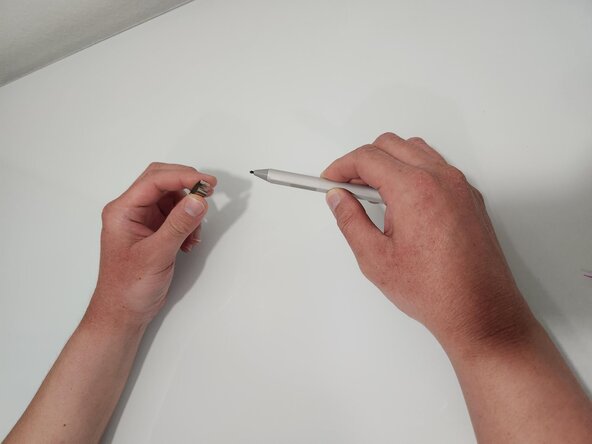
Using the needle-tip extractor, grab the needle-tip at the base and pull straight out.
 Ask FixBot
-
-
-
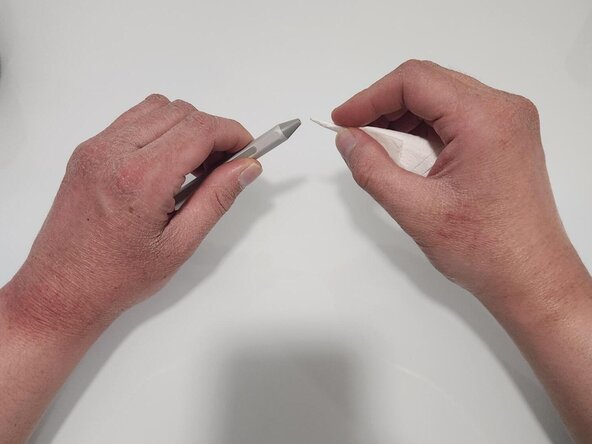
Wrap a small piece of tissue around a toothpick to clean the inside of the needle tip opening.
-
-




Team

CSU Los Angeles, Team 8-3, Grodsky Fall 2025 Member of CSU Los Angeles, Team 8-3, Grodsky Fall 2025
CSULA-GRODSKY-F25S8G3
2 Members
1 Guide authored
