Introduction
This guide takes a deep dive into dissassembling and replacing the battery of the Microsoft Surface Book Keyboard. The steps are nearly identical between sizes.
What you need
-
-
Tool used on this step:Jimmy$7.95
-
You should use an iFixit jimmy tool, a set of screwdrivers containing a Torx T4, a Phillips bit, and an iOpener. You can be risky like me and use a hair dryer and a scraper! The T4 is necessary, though.
 Ask FixBot
-
-
-
Heat up the area until unpleasant to touch using a heat gun or hair dryer.
-
This should be around 130 degrees Fahrenheit.
-
-
-
Use your jimmy to GENTLY pry the cover up. This is hard. It will take a while if you suck like me.
-
-
-
Insert Jimmy.
-
Tilt the jimmy flat.
-
Give the pick a little room to insert.
-
Pull out the Jimmy.
-
Insert into a different location on the device.
-
-
-
-
Disconnect the ribbon cable from the battery to the motherboard. You can disconnect it from the battery side.
-
-
-
Grab a non-metal bucket and fill it with sand. (1/2 gallon should do it)
-
This is in case the batteries get punctured or catch fire when being removed.
-
-
-
Gently, take your opening picks, and VERY, VERY gently, scrape the adhesive out from under the battery.
-
Put the batteries in the bucket and take them to a nearby battery recycling facility. battery recycling facility list
-
-
-
Unpack your new, beautiful, fantastic Surface Book Keyboard battery.
-
Take that battery, and take some of that adhesive, stick it to the back of the battery.
-
Put it on the backplate.
-
Plug in the connector that was keeping you from being able to pull the backplate off.
-
-
-
Take your adhesive, line the edges with the adhesive, and put the backplate back on
-
-


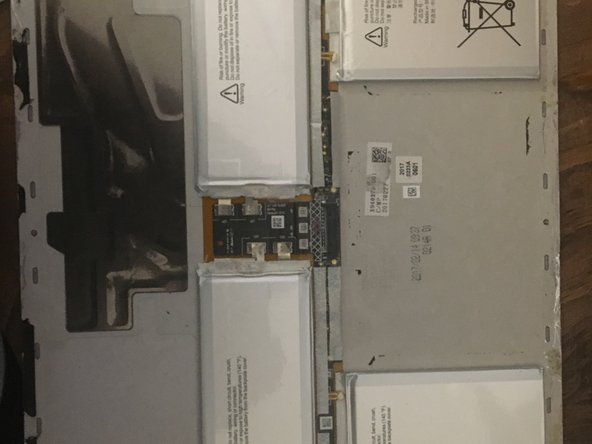

Congratulations! You did it!
TYSM for reading this guide!
To reassemble your device, follow these instructions in reverse order. Just don't pry in reverse. That won't work.
Cancel: I did not complete this guide.
4 other people completed this guide.

1 Guide Comment
Which adhesives should I purchase for this replacement?
