Introduction
If your Microsoft Bluetooth Ergonomic Mouse has a damaged, stuck, or non-functioning scroll wheel, use this guide to remove and replace the scroll wheel assembly.
A faulty scroll wheel may prevent scrolling, middle-click input, or smooth wheel movement.
Before using this guide, verify that software settings or debris buildup are not causing the issue.
What you need
-
-
Remove the battery cover and take out both AAA batteries from the mouse.
 Ask FixBot
-
-
-
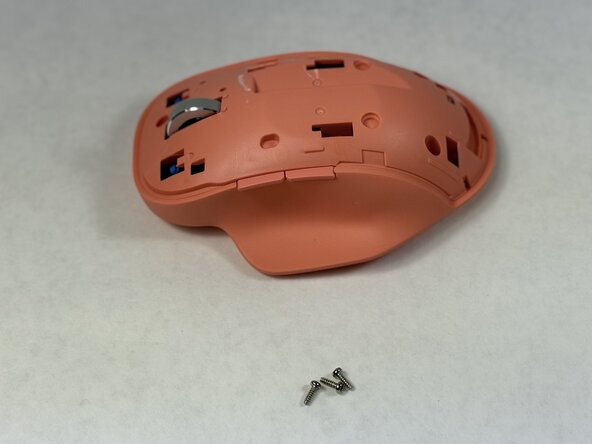
Insert a thin pry tool beneath the seam near the left and right click buttons.
-
Slide the pry tool toward the rear of the mouse while keeping the tool underneath the upper shell clips.
-
Gently release the retaining clips securing the top shell.
-
Continue working around the shell until the top cover separates from the lower housing.
-
-
-
-
Open the inner shell carefully from left to right to access the internal circuits.
-
-
-
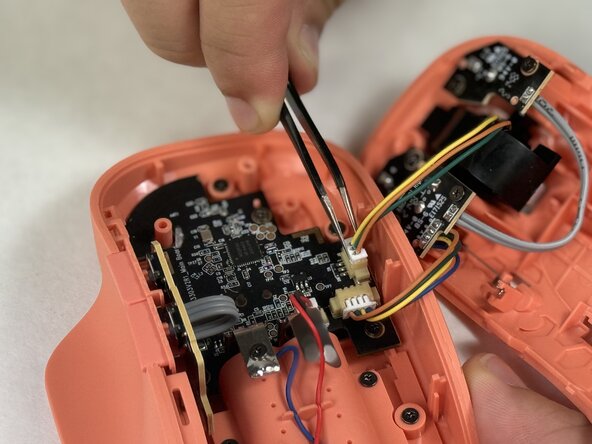
Identify the two white connectors attached to the scroll wheel assembly.
-
Disconnect both connectors from their sockets using tweezers.
-
-
-
Remove the four 4.1 mm Phillips #00 screws securing the left and right scroll wheel boards.
-
Lift both scroll wheel boards from the mouse housing.
-
-
-
Identify the metal spring near the base of the scroll wheel assembly.
-
Unhook and carefully remove the spring using tweezers.
-
-
-
Grip the scroll wheel housing firmly using tweezers or your fingers.
-
Lift the scroll wheel assembly upward and out of the mouse housing.
-
-
-
Inspect the scroll wheel for dirt, debris, or damage affecting scrolling performance.
-
Clean the wheel and housing if debris buildup is present.
-
Replace the scroll wheel assembly if the wheel or housing is damaged.
-






To reassemble your device, follow these instructions in reverse order.

Team

UMass Dartmouth, Team 2-5, Biswokarma Spring 2026 Member of UMass Dartmouth, Team 2-5, Biswokarma Spring 2026
UMASSD-BISWOKARMA-S26S2G5
5 Members
6 Guides authored
