This translation was generated by a machine and has not been reviewed by a person yet. Speak this language? Review it.

Merlin Speaker Socket Repair

Liam JORDAN and one other contributor
Last updated on Sep 7, 2026
Views: 229
View statistics:
- Past 24 Hours:
- 5
- Past 7 Days:
- 31
- Past 30 Days:
- 163
- All Time:
- 229
Comments: 5
1 comment on steps, 4 guide comments.
Go to guide commentsCompleted: 1 2
1 person has marked this guide "completed." Will you be next?
2 people have marked this guide "completed." Including you — great job!
Favorites: 0 1
No one has favorited (and subscribed to) this guide. Will you be the first?
1 person has favorited (and subscribed to) this guide — and that's you!
Community-Contributed Guide
An awesome member of our community made this guide. It was not created by iFixit staff.
Action Shots
Be an action hero! This guide needs images that better demonstrate how to perform specific actions.
Introduction
Go to step 1 ↓Here is a quick guide on how to disassemble a Merlin speaker and repair the socket that was ripped out by the delicacy of children...
What you need
Tools

-
-
-
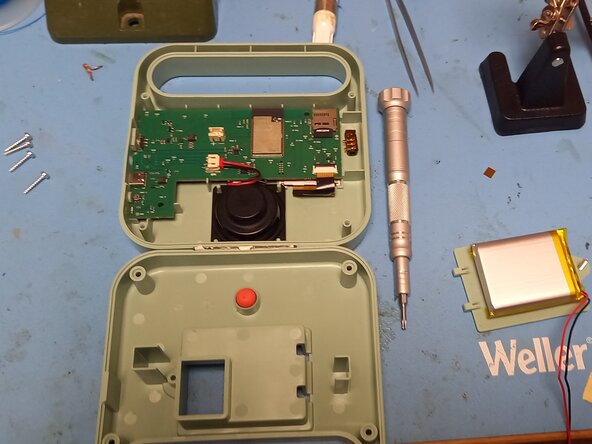
First, open the battery compartment and unplug it.
-
Then unscrew the 4 screws in the corners.
-
In our case, the jack socket was detached and loose inside the speaker.
 Ask FixBot
-
-
-
The broken jack socket reveals the torn pads,
-
Resolder the jack socket onto the remaining pads.
-
-
-
-
Solder wires onto the pins where the pads are missing.
-
Solder the wires to the resistances corresponding to the missing pads. (Follow the traces)
-
-



To reassemble your device, follow these instructions in reverse order.
Cancel: I did not complete this guide.
One other person completed this guide.
4 Guide Comments
Bonjour, auriez vous la référence de la prise jack ? La mienne est cassée.
Merci
@antoinelejeunne Bonjour,
Non je n'ai pas la référence exact car la mienne était intacte dans le boitier, mais en regardant rapidement sur internet, voici un composant qui y ressemble:
https://fr.aliexpress.com/item/100500897...
Si vous l'essayez, dites moi si ça a fonctionné pour valider cette référence.
Cordialement,
Liam
Bonjour,
Merci pour ce tuto. N'avez vous pas eu un soucis avec la carte sd "non détecté" après le remontage ? Puis écran de la Merlin qui ne propose plus que le menu paramètres ?
A nouveau merci
Bonne journée
@azertymaurice Bonjour,
Oui, j'ai un peu repoussé la carte sd dans son logement et ça a refonctionné. La carte sd se trouve en haut à droite de la carte électronique sur la 2ème photo du tuto.
Bonne journée.
