Introduction
This guide shows how to replace the battery in a Mazda CX-30 key fob. If your key fob has reduced range or no longer responds, the battery may be depleted and will need to be replaced.
Replacing the battery is quick and can restore full functionality without needing a dealership visit. A small spudger can make the process easier, but it's not required for the repair.
Take care when opening the key fob to avoid cracking or damaging the plastic case.
What you need
-
-
-
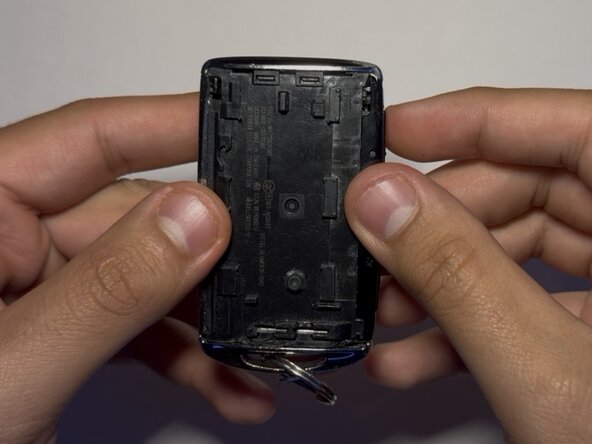
Slide the small black release lever at the top of the key fob downward while pulling the back cover to separate the casing.
 Ask FixBot
-
-
-
-
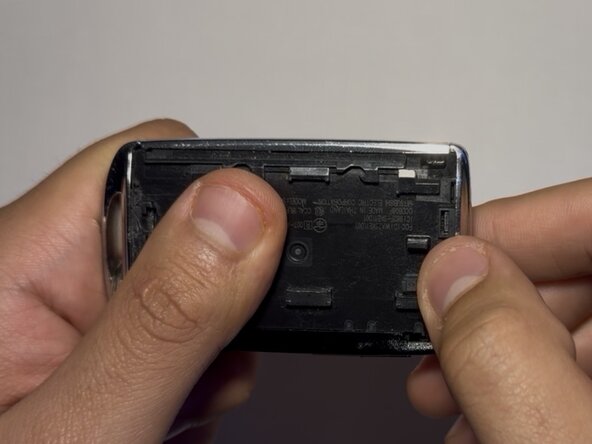
Insert a plastic spudger into the groove at the top of the key fob.
-
Gently pry open the casing.
-
-
-
Insert a plastic spudger or opening pick into the seam of the battery cover.
-
Gently pry the cover loose.
-
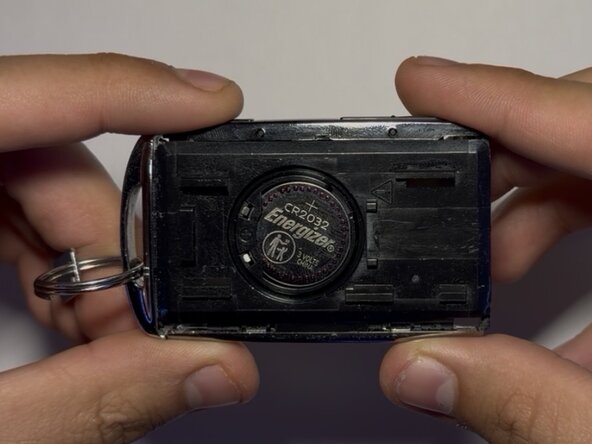
Remove the cover to expose the battery.
-
-
-
Insert a plastic spudger into the gap beside the battery.
-
Gently lift the battery out of its housing.
-
-




To reassemble your device, follow these instructions in reverse order. Take your e-waste to an R2 or e-Stewards certified recycler.

Team

CSU Los Angeles, Team 7-2, Grodsky Spring 2026 Member of CSU Los Angeles, Team 7-2, Grodsky Spring 2026
CSULA-GRODSKY-S26S7G2
1 Member
12 Guides authored
