
MasterCraft Eliminator Waterproof Spotlight Battery Replacement

Sumaiya Islam Rosema and one other contributor
Last updated on Jun 30, 2021
Views: 3.1K
View statistics:
- Past 24 Hours:
- 3
- Past 7 Days:
- 25
- Past 30 Days:
- 108
- All Time:
- 3,097
Comments: 1
1 guide comment.
Go to guide commentsCompleted: 2 3
2 people have marked this guide "completed." Will you be next?
3 people have marked this guide "completed." Including you — great job!
Favorites: 0 1
No one has favorited (and subscribed to) this guide. Will you be the first?
1 person has favorited (and subscribed to) this guide — and that's you!
Needs Better Images
Better photos will improve this guide. Help out by taking, editing, or uploading new ones!
Introduction
Go to step 1 ↓If your MasterCraft Eliminator waterproof Spotlight is not working ,then use this guide to replace the battery of the spotlight .
With times, the battery gets weak as a reason it doesn’t work properly .But most of the people throw the spotlight thinking that it can not be change and buy new one. This guide will help people how easily the battery can be change with low cost and at the same time money can be save from not throwing the spotlight.
Before using this guide, inspect the spotlight is it has any other problems or not. Typically, if the spotlight body has dust then can be removed using brush or small dust blower .
What you need
Tools


-
-
-
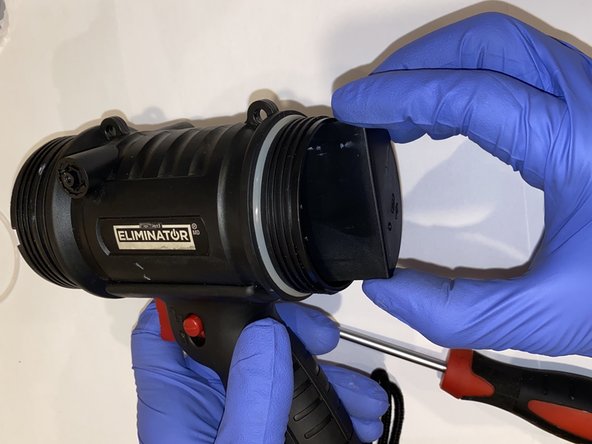
Twist the front cover of the spotlight in a counter-clockwise rotation and remove it from the device.
 Ask FixBot
-
-
-
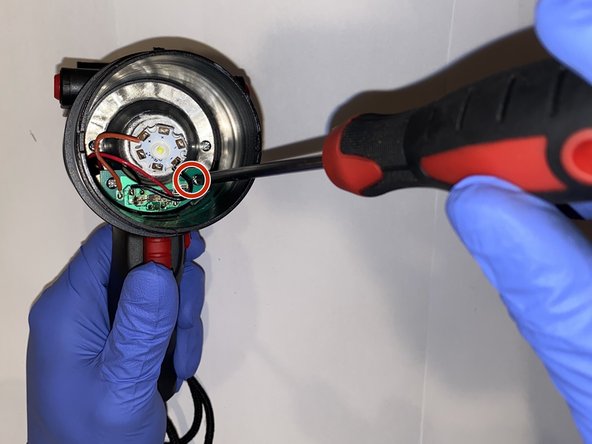
Using the JIS #00 screwdriver, remove the two screws securing the motherboard to the device.
-
-
-
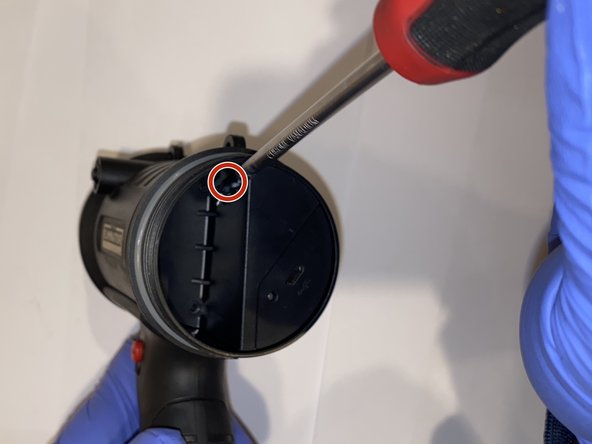
Using the JIS #00 screwdriver, remove the single screw securing the charging port and remove the charging port from the device.
-
-
-






To reassemble your device, follow these instructions in reverse order.
Cancel: I did not complete this guide.
2 other people completed this guide.

Team

York University, Team S1-G27, Melo-Thaiss Summer 2021 Member of York University, Team S1-G27, Melo-Thaiss Summer 2021
YORK-MELO-THAISS-SU21S1G27
1 Member
12 Guides authored
