
Martian Victory Motherboard Replacement

Dominic Coffey and 6 other contributors
Last updated on May 7, 2024
Views: 600
View statistics:
- Past 24 Hours:
- 3
- Past 7 Days:
- 13
- Past 30 Days:
- 77
- All Time:
- 600
Comments: 1
1 comment on steps.
Completed: 0 1
No one has marked this guide "completed." Will you be the first?
1 person has marked this guide "completed." It's you — great job!
Favorites: 0 1
No one has favorited (and subscribed to) this guide. Will you be the first?
1 person has favorited (and subscribed to) this guide — and that's you!
Introduction
Go to step 1 ↓How to access and remove the motherboard of the Martian Smartwatch
What you need
Tools
-
-
-
Spudger4.9


-
-
-
Carefully lift the back plate off the watch. You will notice a lithium battery and rubber gasket attached to the back plate.
-
-
-
-
Using the plastic removal tool, pry the battery from the backing plate. The battery is simply attached with glue.
-
-
-
Desolder the battery connections from the motherboard. Learn how to solder components here!
-
-
-
-
Tool used on this step:Tweezers$4.99
-
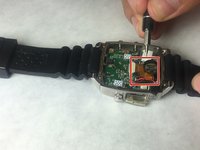
Use a spudger or tweezers to remove a white sticker that covers a Phillips head screw.
-
-
-
-
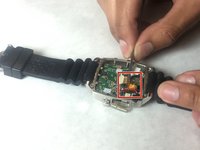
Use ESD safe tweezers to remove the gold ribbon cable.
-
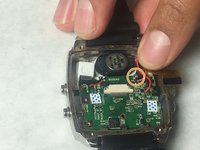
This will expose a second 5.2mm Phillips head screw that can be removed with a PH00 screwdriver.
-
-
-
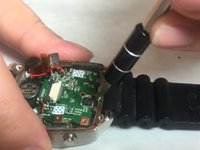
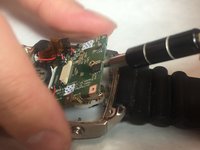
Use a spudger to gently pry on the motherboard towards the top of the watch, being towards the 12 o'clock position to loosen the motherboard.
-
You can now access the parts and pieces on the bottom of, and below the motherboard.
-


 Ask FixBot




To reassemble your device, follow these instructions in reverse order.

Team

IUPUI, Team 3-3, Baechle Fall 2016 Member of IUPUI, Team 3-3, Baechle Fall 2016
IUPUI-BAECHLE-F16S3G3
4 Members
96 Guides authored
