Free Shipping on Domestic Orders $75+

Martian Victory Lithium Battery Replacement

What you need

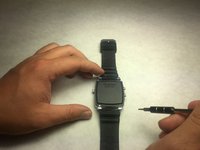
  1. Martian Victory Lithium Battery Replacement, Back Plate: step 1, image 1 of 2 Martian Victory Lithium Battery Replacement, Back Plate: step 1, image 2 of 2
    • Unscrew the four 3.4 mm flat head screws

    Ask FixBot

    Add Comment

  2. Martian Victory Lithium Battery Replacement: step 2, image 1 of 1
    • Carefully lift the back plate off the watch. You will notice a lithium battery and rubber gasket attached to the back plate.

    Ask FixBot

    Add Comment

  3. Martian Victory Lithium Battery Replacement, Lithium Battery: step 3, image 1 of 1
    • If not replacing lithium battery, skip down two steps.

    • Using the plastic removal tool, pry the battery from the backing plate. The battery is simply attached with glue.

    Ask FixBot

    Add Comment

  4. Martian Victory Lithium Battery Replacement: step 4, image 1 of 1
    • Desolder the battery connections from the motherboard. Learn how to solder components here!

    Ask FixBot

    Add Comment

Conclusion

To reassemble your device, follow these instructions in reverse order.

Cancel: I did not complete this guide.

One other person completed this guide.

David Miller

Member since: 10/24/16

246 Reputation

2 Guides authored

Team

IUPUI, Team 3-3, Baechle Fall 2016 Member of IUPUI, Team 3-3, Baechle Fall 2016

IUPUI-BAECHLE-F16S3G3

4 Members

8 Guides authored

1 Guide Comment

I’m wondering… where did you buy the replacement battery?

Randy Trask - Reply Share

Add Comment

View Statistics:

Past 24 Hours: 0

Past 7 Days: 4

Past 30 Days: 31

All Time: 1,154