Introduction
If your Marshall Uxbridge speaker (model 1005605) does not work even when plugged in, use this guide to replace the power port.
The power port connects the power cord to the speaker. A faulty power port can cause power failure.
Before using this guide, inspect the power cord to ensure it is plugged into the correct outlet for the device and is free from damage.
Before you begin, make sure to power off completely and disconnect from the power source.
What you need
-
-
Orient your speaker so that the back is facing you.
-
Use a Phillips #2 screwdriver to remove the six 19mm screws from the back plate.
-
Use an iFixit opening pick to remove and lift the back plate to expose the connected wires.
 Ask FixBot
-
-
-
Detach the white connector from inside the bottom of the back panel.
-
Detach the small red and white connectors from the motherboard on the left side of the back panel.
-
-
-
-
Pull the blue ribbon cables from the motherboard.
-
Remove the back panel from the speaker base.
-
-
-
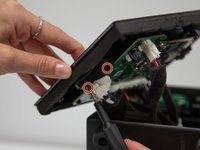
Use a Phillips #2 screwdriver to remove the two 12 mm screws holding the power port to the back plate.
-
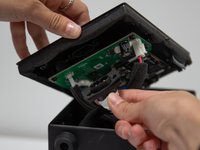
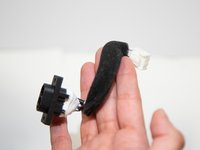
Remove the power port from the back plate.
-
-
-
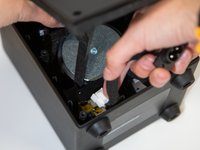
Unplug the power port cord from the board at the white connector by pushing down on the tab, holding onto the connector, and pulling the connector out.
-




To reassemble your device, follow these instructions in reverse order.
Cancel: I did not complete this guide.
One other person completed this guide.

Team

Western Carolina University, Team 1-1, Virtue Fall 2024 Member of Western Carolina University, Team 1-1, Virtue Fall 2024
WCU-VIRTUE-F24S1G1
4 Members
5 Guides authored
