Free Shipping on Domestic Orders $75+

Marshall Major IV Driver Assembly Replacement

What you need

  1. Marshall Major IV Driver Assembly Replacement, Battery: step 1, image 1 of 1
    • Twist the left earpad counter-clockwise to remove it.

    Ask FixBot

    Add Comment

  2. Marshall Major IV Driver Assembly Replacement: step 2, image 1 of 1
    • Remove the protective seal on the driver assembly.

    Ask FixBot

    Add Comment

  3. Marshall Major IV Driver Assembly Replacement: step 3, image 1 of 2 Marshall Major IV Driver Assembly Replacement: step 3, image 2 of 2
    • Remove all four of the 4 mm Phillips #1 screws securing the driver assembly.

    Ask FixBot

    Add Comment

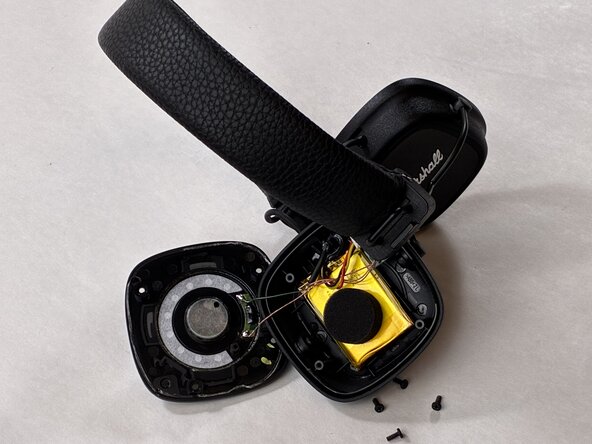
  4. Marshall Major IV Driver Assembly Replacement: step 4, image 1 of 2 Marshall Major IV Driver Assembly Replacement: step 4, image 2 of 2
    • Gently remove the driver assembly and set it beside the housing, with care not to strain the connected cables.

    Ask FixBot

    Add Comment

  5. Marshall Major IV Driver Assembly Replacement: step 5, image 1 of 1
    • Unplug the white battery connector from the PCB.

    Ask FixBot

    Add Comment

  6. Marshall Major IV Driver Assembly Replacement: step 6, image 1 of 1
    • Use an opening tool to gently pry up and remove the battery.

    Ask FixBot

    Add Comment

  7. Marshall Major IV Driver Assembly Replacement, Driver Assembly: step 7, image 1 of 1
    • Desolder the two driver connections.

    • Remove the driver assembly.

    Ask FixBot

    Add Comment

Conclusion

To reassemble your device, follow the above steps in reverse order.
Take your e-waste to an R2 or e-Stewards certified recycler.
Repair didn’t go as planned? Try some basic troubleshooting or ask our Answers community for help.

Cancel: I did not complete this guide.

Drew Kavanagh

Member since: 04/03/26

483 Reputation

4 Guides authored

Team

0 Guide Comments

Add Comment

View Statistics:

Past 24 Hours: 3

Past 7 Days: 13

Past 30 Days: 69

All Time: 129