Introduction
If your Marshall Major IV headphones are not holding a charge, dying quickly, or not turning on unless plugged in, the battery is likely faulty. The battery is attached to wires on whichever side of the headphones you are having trouble with. You will need to make sure that the headset is turned off during this procedure. You should also have spudgers and a screwdriver on hand for this. This guide will walk you through how to safely replace the internal battery.
What you need
-
-
-
-
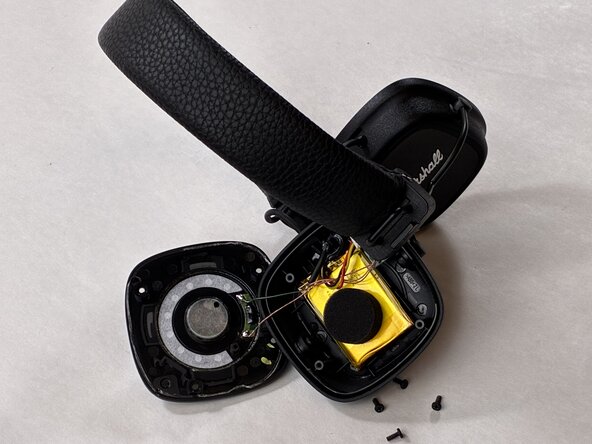
Gently remove the driver assembly and set it beside the housing, with care not to strain the connected cables.
-

 Ask FixBot




To reassemble your device, follow the above steps in reverse order.
For optimal performance, after completing this guide, calibrate your newly installed battery.
Take your e-waste to an R2 or e-Stewards certified recycler.
Repair didn’t go as planned? Try some basic troubleshooting or ask our Answers community for help.
Cancel: I did not complete this guide.
One other person completed this guide.

Team

UMass Dartmouth, Team 2-3, Biswokarma Spring 2026 Member of UMass Dartmouth, Team 2-3, Biswokarma Spring 2026
UMASSD-BISWOKARMA-S26S2G3
5 Members
48 Guides authored
