Introduction
The motherboard is responsible for giving power and electricity to the speaker. With time, the motherboard can overheat and stop working. You must use the TR-9 screw to replace the motherboard. This replacement guide will teach you how to replace the whole motherboard. Be cautious because the motherboard is fragile.
What you need
-
-
-
Pry the front of the speaker off using your nails or a device capable of fitting inside the crevice.
-
-

 Ask FixBot


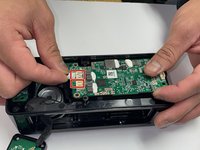
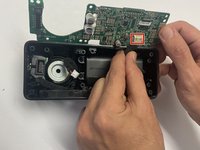
To reassemble your device, follow these instructions in reverse order.
Cancel: I did not complete this guide.
2 other people completed this guide.

Team

CSU Los Angeles, Team 5-1, Adachi Fall 2022 Member of CSU Los Angeles, Team 5-1, Adachi Fall 2022
CSULA-ADACHI-F22S5G1
5 Members
60 Guides authored
1 Guide Comment
How or where can I purchase a new motherboard for my Emberton II? My won’t charge the battery any longer, I’ve since bought another speaker but would like to repair this one if I can get my hands on a new motherboard. Thanks in advance.
