
MacBook Pro 15" Retina Display Mid 2015 SSD Replacement

Sam Goldheart and 11 other contributors
Last updated on Dec 8, 2022
Views: 567K
View statistics:
- Past 24 Hours:
- 37
- Past 7 Days:
- 305
- Past 30 Days:
- 1,491
- All Time:
- 567,113
Comments: 170
84 comments on steps, 86 guide comments.
Go to guide commentsCompleted: 308 309
308 people have marked this guide "completed." Will you be next?
309 people have marked this guide "completed." Including you — great job!
Favorites: 46 47
46 people have favorited (and subscribed to) this guide. Will you be next?
47 people have favorited (and subscribed to) this guide — including you!
Featured Guide
This guide has been found to be exceptionally cool by the iFixit staff.
Introduction
Go to step 1 ↓Use this guide to upgrade or replace the solid-state drive in a MacBook Pro 15” Mid 2015. This MacBook Pro uses a proprietary storage drive connector, and is therefore not compatible with common M.2 drives without the use of an adapter.
Before you perform this repair, if at all possible, back up your existing SSD. Then, either familiarize yourself with internet recovery or create a bootable external drive so you’ll be ready to install macOS onto your new drive and migrate your data to the new SSD.
Finally, we strongly recommend installing macOS 10.14 Mojave (or a later macOS) before replacing the original SSD from your MacBook Pro. Most new SSDs require updated storage drivers not found in versions of macOS prior to macOS 10.14 Mojave.
What you need


-
-
-
Remove the following P5 pentalobe screws securing the lower case to the MacBook Pro:
-
Eight 3.1 mm
-
Two 2.3 mm
 Ask FixBot
-
-
-
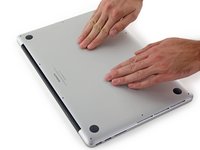
Lifting from the edge nearest the clutch cover, lift the lower case off the MacBook Pro.
-
-
-
-
-
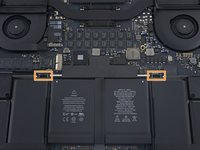
Gently lift each side of the battery connector to pry the connector out of its socket on the logic board.
-
Bend the connector back toward the battery, ensuring that the battery connector doesn't accidentally make contact with the logic board.
-
-
-
-
-
Remove the single 2.9 mm T5 Torx screw securing the SSD to the logic board.
-
-
-
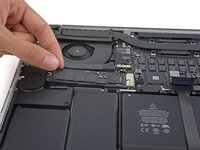
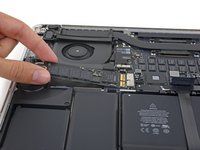
Lift the end of the SSD up enough to pass over the speaker directly behind it.
-
Pull the SSD straight out of its socket on the logic board.
-
-


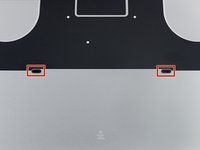


To reassemble your device, follow these instructions in reverse order.
Cancel: I did not complete this guide.
308 other people completed this guide.


86 Guide Comments
So guys, I got a couple of questions:
1. Is this model (MBP Retina Mid 2015/MacBookPro11,4 ) really upgradable? https://www.datenreise.de/en/macbook-pro... says otherwise.
2. Samsung 850 EVO or Samsung 850 PRO would work with the model mentioned above?
Yes, it is upgradeable. At the time that article was published there was no drive on the market that would work. Now there is. No the Samsung 850 EVO or Pro would not work. As far as I know OWC is the only one that produces an after market drive that is compatible.
I couldn't find the SSD that Chris mentioned. Would you please point out the exact model?
It’s the OWC Aura Pro X2, you can get it all the up to 2TB.
