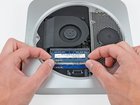
Mac mini Late 2012 RAM Replacement

Last updated on Jun 27, 2018
Views: 153K
View statistics:
- Past 24 Hours:
- 9
- Past 7 Days:
- 71
- Past 30 Days:
- 347
- All Time:
- 152,822
Comments: 28
21 comments on steps, 7 guide comments.
Go to guide commentsCompleted: 187 188
187 people have marked this guide "completed." Will you be next?
188 people have marked this guide "completed." Including you — great job!
Favorites: 75 76
75 people have favorited (and subscribed to) this guide. Will you be next?
76 people have favorited (and subscribed to) this guide — including you!
Featured Guide
This guide has been found to be exceptionally cool by the iFixit staff.
What you need
Fix Kit
This kit contains all the parts and tools needed to complete this guide.

Parts
-
PC3-12800 2 GB RAM Chip$25.99
-
-


Introduction
Go to step 1 ↓Removing the RAM is an easy task that requires no tools.
-
-
-
Place your thumbs in the depressions cut into the bottom cover.
-
Rotate the bottom cover counter-clockwise until the white dot painted on the bottom cover is aligned with the ring inscribed on the outer case.
 Ask FixBot
-
-
-
-
Tilt the mini enough to allow the bottom cover to fall away from the outer case.
-
Remove the bottom cover and set it aside.
-
-
-
-
-
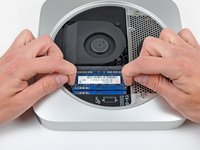
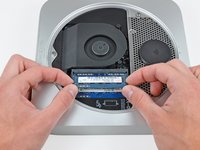
Release the tabs on each side of the RAM chip by simultaneously pushing each tab away from the chip.
-
After the RAM chip has popped up, pull it straight out of its socket.
-
-


To reassemble your device, follow these instructions in reverse order.
Cancel: I did not complete this guide.
187 other people completed this guide.


7 Guide Comments
Dear everyone,
Does this mac mini accept :
KINGSTON DDR3 PC3-12800 - 2 x 4 Go (8 Go) 1600 MHZ - CAS 10 - HyperX Fury Black Series
Thank you.
I always consult Crucial's memory configuration tool. For a late-2012 Mac mini, see http://www.crucial.com/usa/en/compatible....
According to them, this Mac can go up to 16GB (2 SO-DIMMs of 8GB each). The SO-DIMMs should be DDRL3L-1600 (DDR3L PC3L-12800, CL=11, unbuffered, non-ECC, DDR3L-1600, 1.35v)
The SO-DIMMs you mentioned seem like they should be compatible (CL=10 should work fine in a computer that can accept CL=11). But I would only buy from a vendor that has a compatibility guarantee. If there's a problem, I would want to be able to return them for a refund.
The SODIMMs don't need to be low voltage DDR3L (i.e. 1.35 volt). In fact Apple recommends (https://support.apple.com/en-gb/HT202593) regular 1.5 volt DDR3 and most late 2012 Mac Minis were shipped with it. So is Crucial wrong? The truth is that either will work.
