Free Shipping on Domestic Orders $75+

Mac Pro Late 2013 SSD Replacement

What you need

  1. Mac Pro Late 2013 SSD Replacement, Outer Case: step 1, image 1 of 2 Mac Pro Late 2013 SSD Replacement, Outer Case: step 1, image 2 of 2
    • Slide the lock switch to the right, to the unlocked position.

    Ask FixBot

    Add Comment

  2. Mac Pro Late 2013 SSD Replacement: step 2, image 1 of 3 Mac Pro Late 2013 SSD Replacement: step 2, image 2 of 3 Mac Pro Late 2013 SSD Replacement: step 2, image 3 of 3
    • Lift the outer case straight up off the Mac Pro.

    • It may help to push down on the center of the fan while lifting the case up.

    Ask FixBot

    Add Comment

  3. Mac Pro Late 2013 SSD Replacement, SSD: step 3, image 1 of 1
    • Remove the single 6.5 mm T8 Torx screw.

    Ask FixBot

    Add Comment

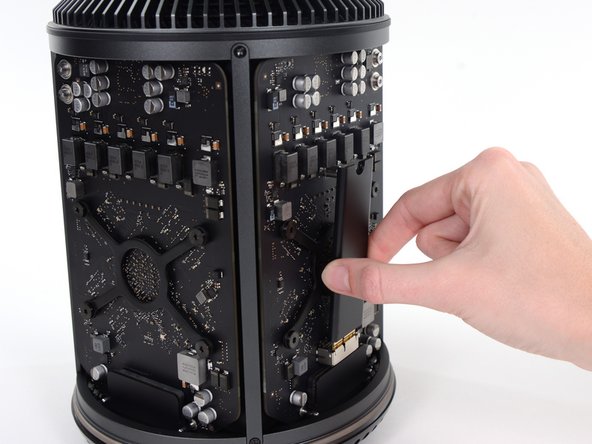
  4. Mac Pro Late 2013 SSD Replacement: step 4, image 1 of 3 Mac Pro Late 2013 SSD Replacement: step 4, image 2 of 3 Mac Pro Late 2013 SSD Replacement: step 4, image 3 of 3
    • Pull the SSD slightly away from the graphics card.

    • Do not pull the top edge of the SSD more than 1/2" away from the graphics card, or you will risk damaging it.

    • Lift the SSD straight up out of its slot on the graphics card.

    Ask FixBot

    Add Comment

Conclusion

To reassemble your device, follow these instructions in reverse order.

Cancel: I did not complete this guide.

44 other people completed this guide.

Andrew Optimus Goldheart

Member since: 10/17/09

515,187 Reputation

407 Guides authored

Team

iFixit Member of iFixit

Staff

122 Members

26,593 Guides authored

9 Guide Comments

Will a 970 evo 512 gb pcie m2 fit on here?

Sam Yao - Reply Share

As long as the drive is not the Plus version, you may be able to use an adapter in order to use that SSD in your MacPro6,1:

https://www.amazon.com/Sintech-Adapter-U...

I have not tried this, but am, currently, researching a fix for a machine in my care.

Robert Maxwell - Reply Share

Yes—works very well with the Sintech adaptor (and even with an EK-M.2 NVMe Heatsink — use thermal paste for longevity!).

Just did this yesterday and it’s a great/fast/easy upgrade.

ericbalog - Reply Share

Do you need a heat sink in the SSD?

Cesar Cuenca - Reply Share

The stock (Samsung) drive(s) that shipped (from Apple) with these machines do not; unless the black, outer covering helps with heat. [???]

I have had both a Samsung MZ-JPU256T/0A1 (256GB) and Samsung MZ-KPU1T0T/0A1 (1TB) installed in my machine without issue.

Third-party drives may include or heatsink and/or require at least 10.13 (High Sierra).

Robert Maxwell - Reply Share

Add Comment

View Statistics:

Past 24 Hours: 9

Past 7 Days: 99

Past 30 Days: 379

All Time: 98,043